How to connect Suunto Race to laptop with Visual Studio Code?
-
I have now managed to create two different apps and they seemingly run pretty OK in the simulator - but any advice / guide on how to connect the watch to VS Code, so that I can try the apps before releasing them?
I have disconnected the watch from the phone, rebooted watch, rebooted computed, reinstalled the Suunto+ VS Code extension, reinstalled VS Code and checked the VS Code settings - still no success.
Any help would be much appreciated - situation is frustrating to say the least after spending hours on the apps…
-
@DonTomGot
With your USB charger cable (I guess)SSU (retired), SV1, SV2
Wife : S9PP
SA: Always the latest beta :)
Android + Galaxy S205G -
@DonTomGot this Guide talks about a Bluetooth connection:
https://forum.suunto.com/topic/14651/how-to-get-started -
@Mff73 USB doesn’t work either. After connecting to the laptop it only charges the watch - no data transfer.
I have followed the guide, that unfortunately does not cover much, and no troubleshooting section either.
-
@DonTomGot firstly, in the watch delete the connection to the app in connectivity -> paired devices.
Then open the BT settings on your computer and search for new devices. The watch should show up and pair with the key as normal.
-
As it might help someone else that stumbles on the same problem… At least for me it was this Win11 setting that changed things for the better:
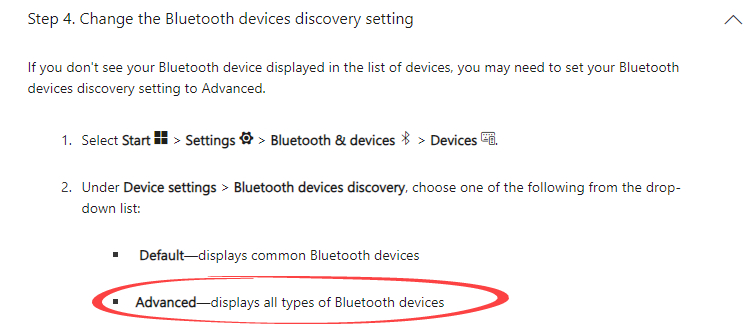
Seems stupid in hindsight, but I was not aware that Default only identifies low-power connectivity Bluetooth devices.Happy days! no I will be able to test my apps!



Hello! It looks like you're interested in this conversation, but you don't have an account yet.
Getting fed up of having to scroll through the same posts each visit? When you register for an account, you'll always come back to exactly where you were before, and choose to be notified of new replies (either via email, or push notification). You'll also be able to save bookmarks and upvote posts to show your appreciation to other community members.
With your input, this post could be even better 💗
Register Login