Several navigation issues (feedback)
-
@Joaquin said in Several navigation issues (feedback):
you will have it, but in reverse; that is, instead of going from left to right, you will see how the ascent guide will go from right to left, and you will always have the current segment, updating to your route direction
Can someone please tell the Suunto team that the elevation profile (climb guidance) updating in reverse right to left with the color swapped is a very questionable solution. I find it extremely confusing. It isn’t a good user experience in my experience.
And in general the whole idea of automatic route reversal is more trouble than it is worth 90% of the time. Just two days ago I tried "Navigate on watch now function and as soon as I used it the watch showed a notification that I have reached the destination, followed shortly by an off route notification and then followed shortly by back on route notification. I can only assume it immediately reversed the route. There are many more examples of the route reversal messing things up. For one case of when I truly want the route reversed there are 9 cases of when it wrongly reverses it.
-
@sky-runner Changing the colors in reverse is difficult, although we’re working on it. The current segment is indeed inverted,I hope we can do this at some point.
-
One thing that is not actual navigation but very much related: In yesterday’s Race I loaded the course and started navigation without TbT just to be able to see where the route would be just in case. As I run through the finish point, I got a full screen notification that I reached the end of the course and had to dismiss this notification to be able to actually stop my activity tracking.
I think the upper button should have paused regardless…
-
Edit. I just realized joaquin’s photo I was referencing is comparing a Coros with Garmin, and that Coros does also have an offset, which seems even bigger than what is seen in Suunto.
Removed bad photo (of my post)
In those photos you see only a 3 meter offset with Garmin, but I’m finding many turns with much more distance offset with Komoot’s algorythms, as explained. Even something like 15 meters several times.
Suunto Vertical 2 Titanium Sage, Suunto Run
-
@dreamer_ I didn’t remove any photo or modify the post, so I’m not sure what you’re referring to.
As I mentioned before, turn notifications depend on the vector map data that generated that turn. Even when using the same map provider, you can still have different turn thresholds depending on the algorithm or routing engine used, as well as the map update frequency of each platform.
That’s why sometimes Garmin is more reactive, other times Suunto, and other times COROS. In any case, navigation remains perfectly usable on all of them.
These are simply normal differences and limitations across platforms.
-
@Joaquin said in Several navigation issues (feedback):
@dreamer_ I didn’t remove any photo or modify the post, so I’m not sure what you’re referring to.
As I mentioned before, turn notifications depend on the vector map data that generated that turn. Even when using the same map provider, you can still have different turn thresholds depending on the algorithm or routing engine used, as well as the map update frequency of each platform.
That’s why sometimes Garmin is more reactive, other times Suunto, and other times COROS. In any case, navigation remains perfectly usable on all of them.
These are simply normal differences and limitations across platforms.
The photo was removed by me, not you @joaquin . I misunderstood one of the photos and that’s why I corrected the post
-
@dreamer_ all clear
 ️ I didn’t understand what you meant.
By the way, it would be great if you were in Zegama, Val de Aran, Mallorca, or Andorra UTMB. It would be nice to meet you, and I’m sure we’d have a nice chat about GPS gadgets. -
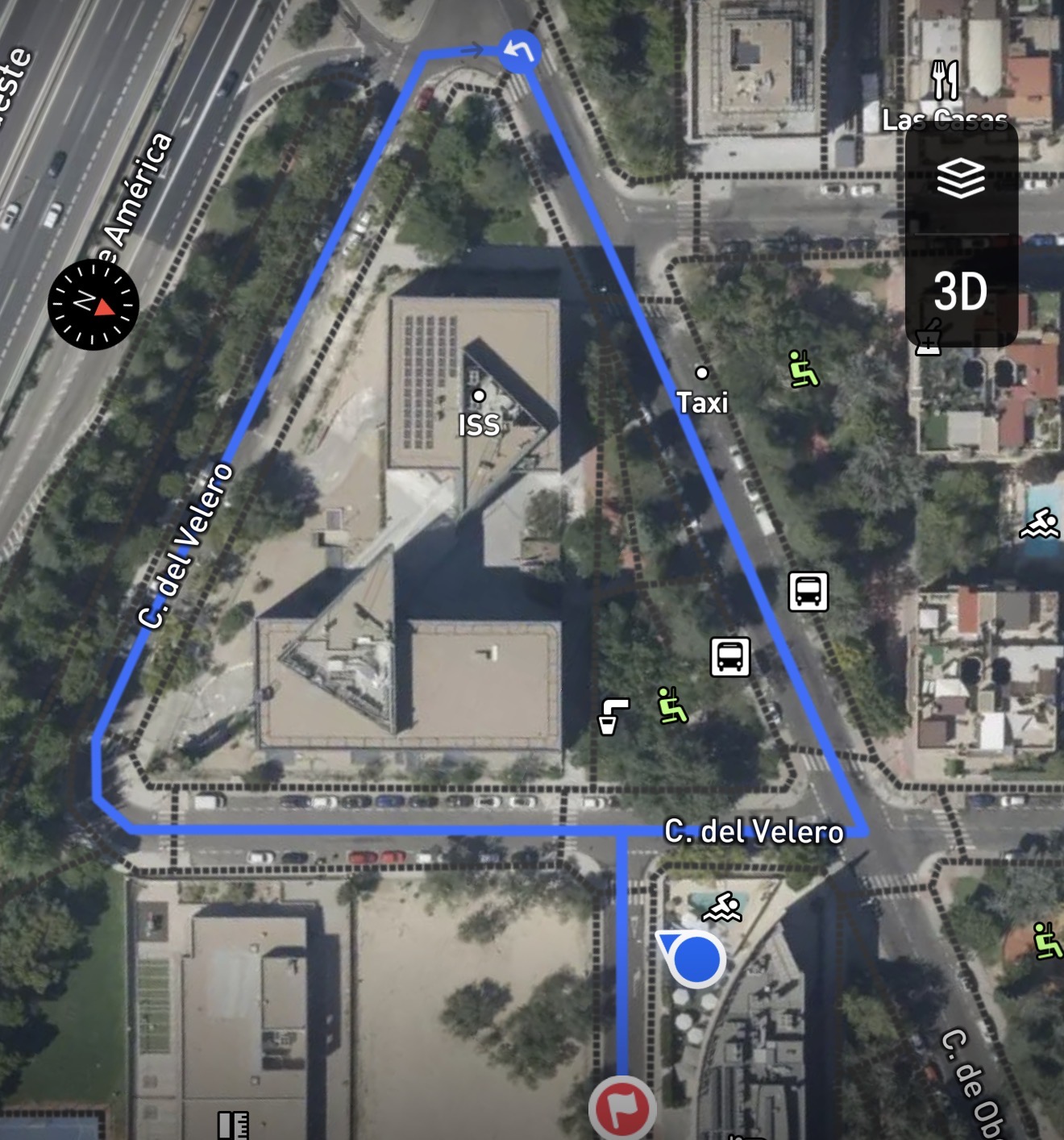
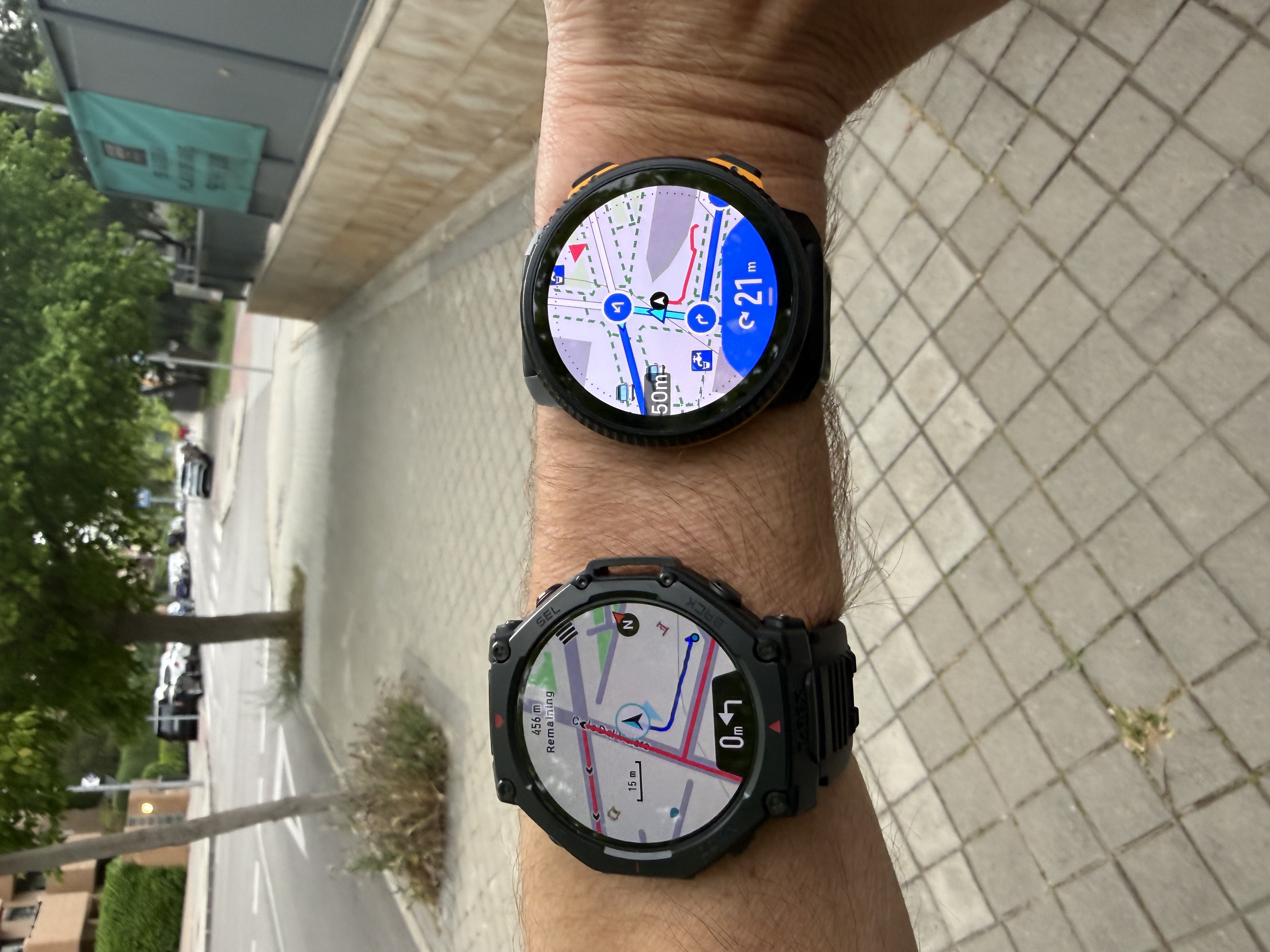
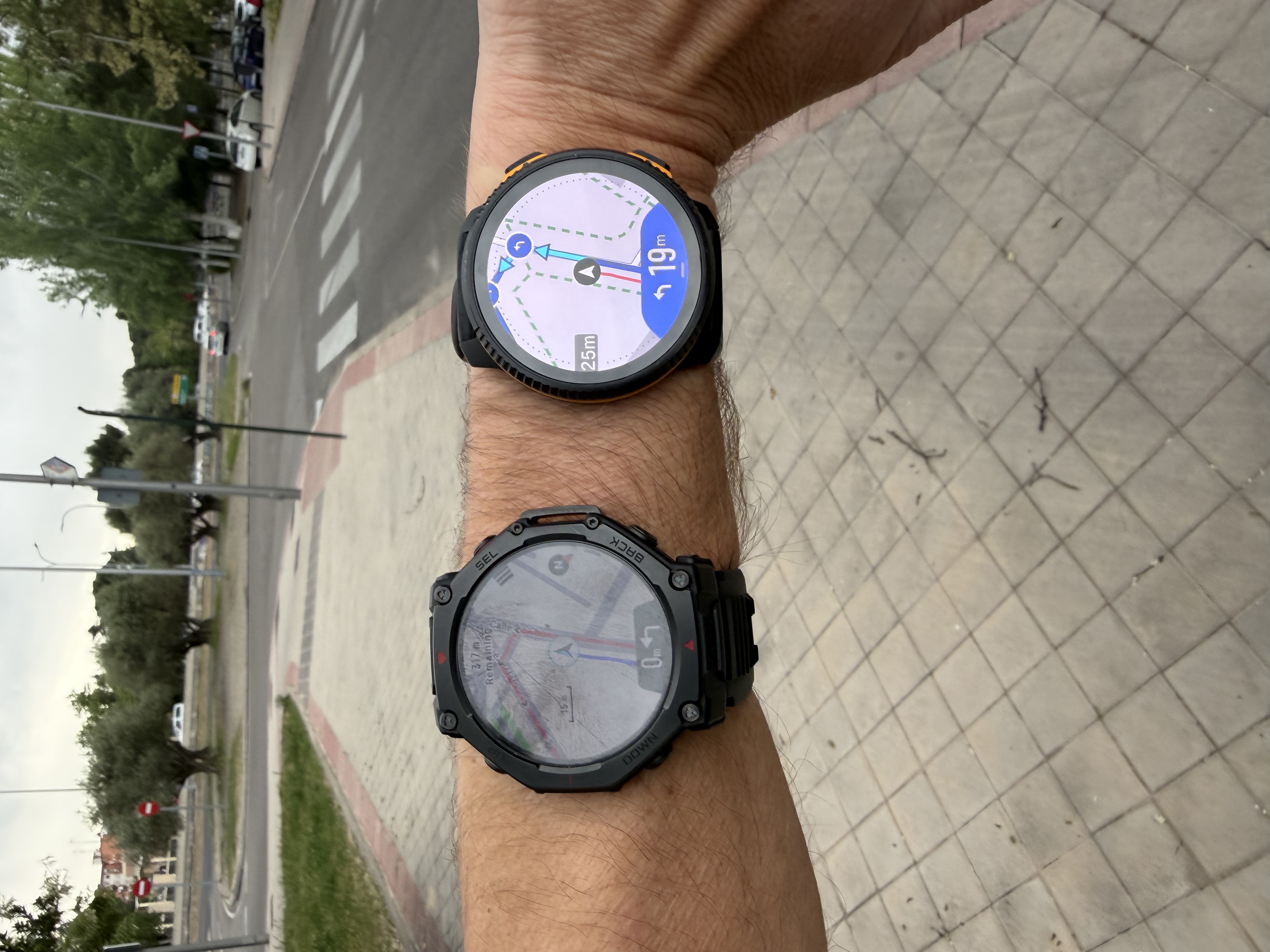
@dreamer_ I did a quick test route in Madrid, in an area where I don’t usually run, created natively in each platform (Suunto App, COROS App, Garmin Connect, and Amazfit App) to avoid any inconsistencies coming from GPX imports.
For clarity, I’ll only show the first three turns. For example, COROS only generates one turn here (the third one).
As you can see, each platform interprets turns differently depending on their routing engine, vector map data, and turn detection thresholds.
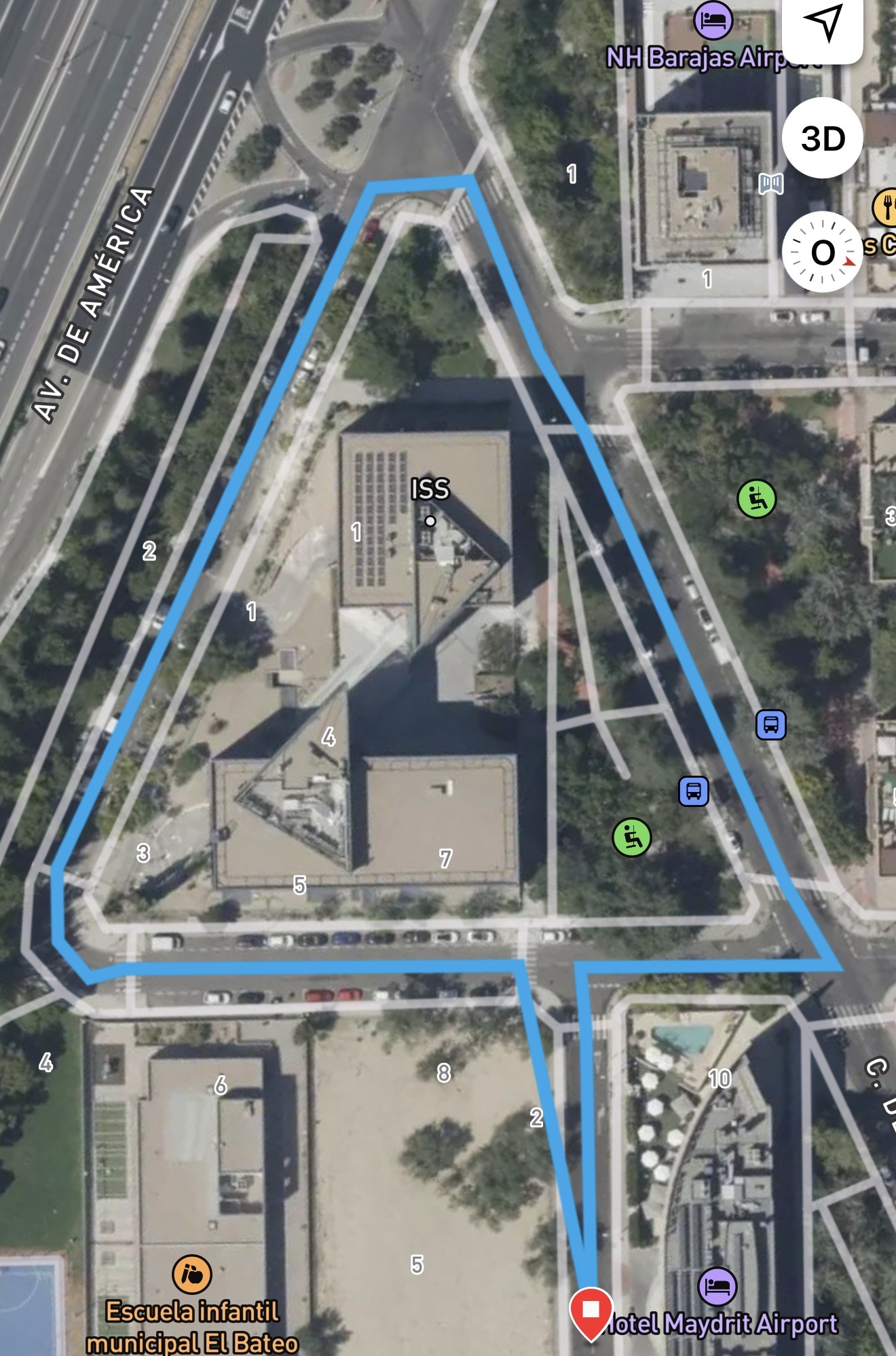
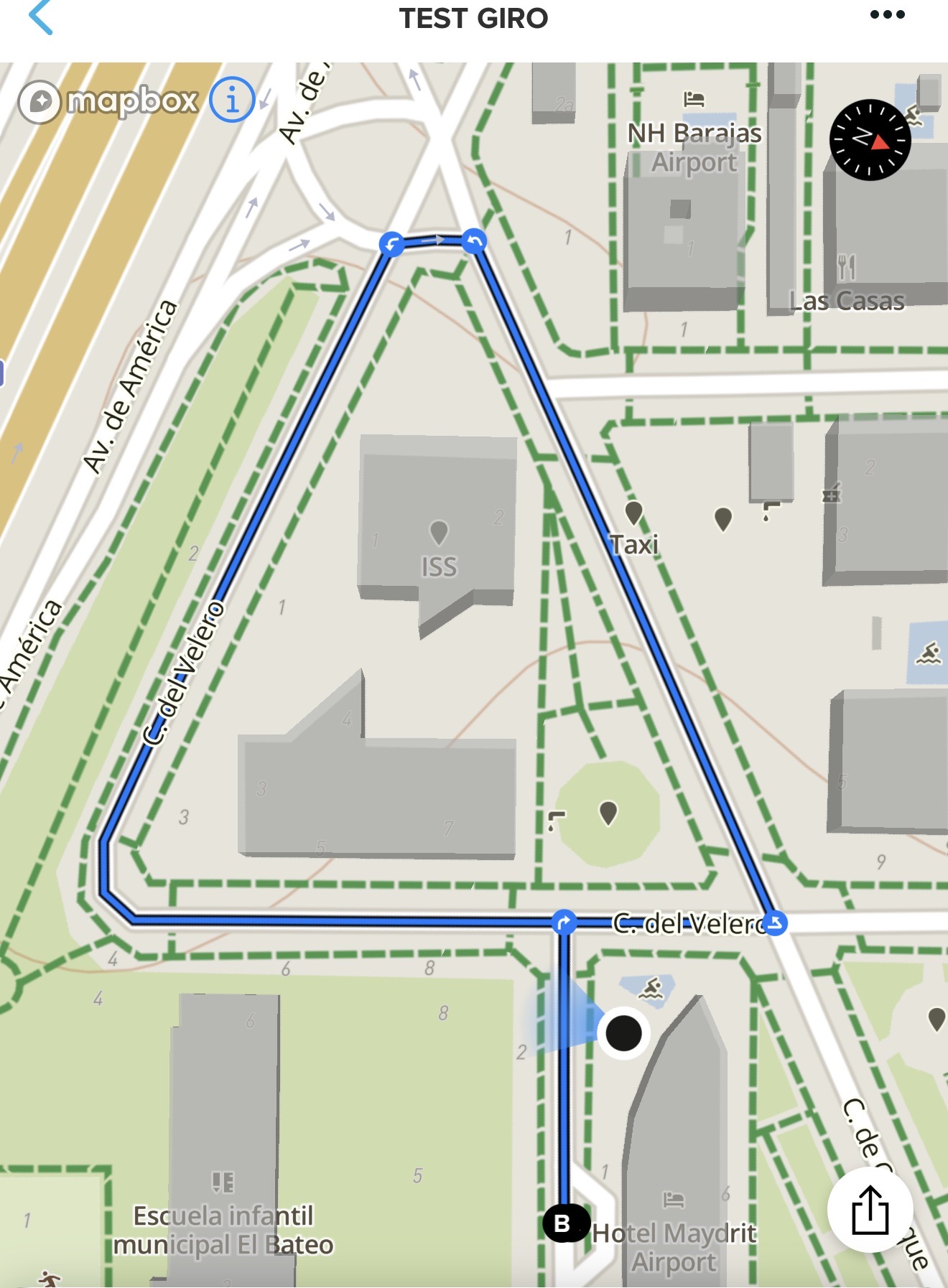
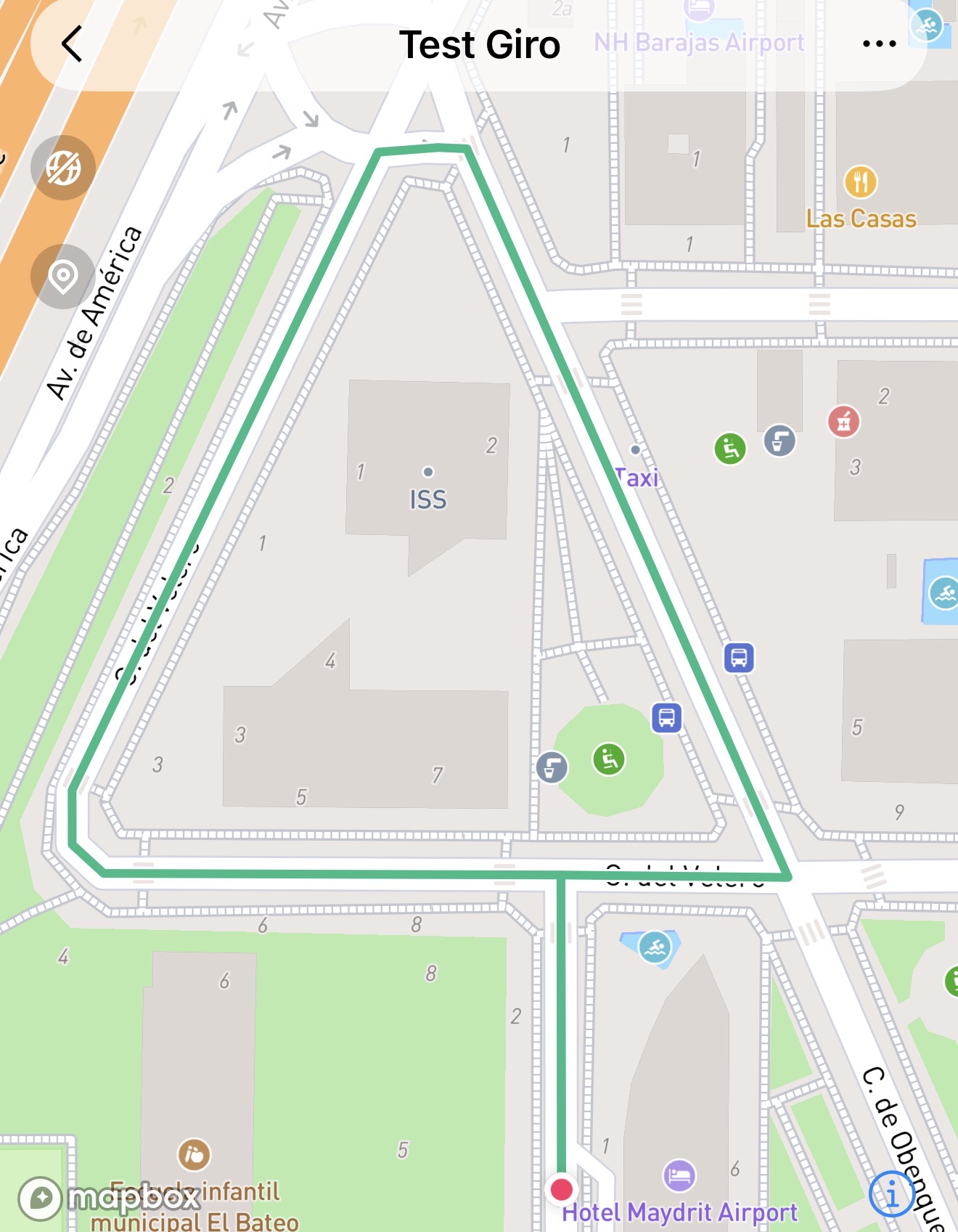
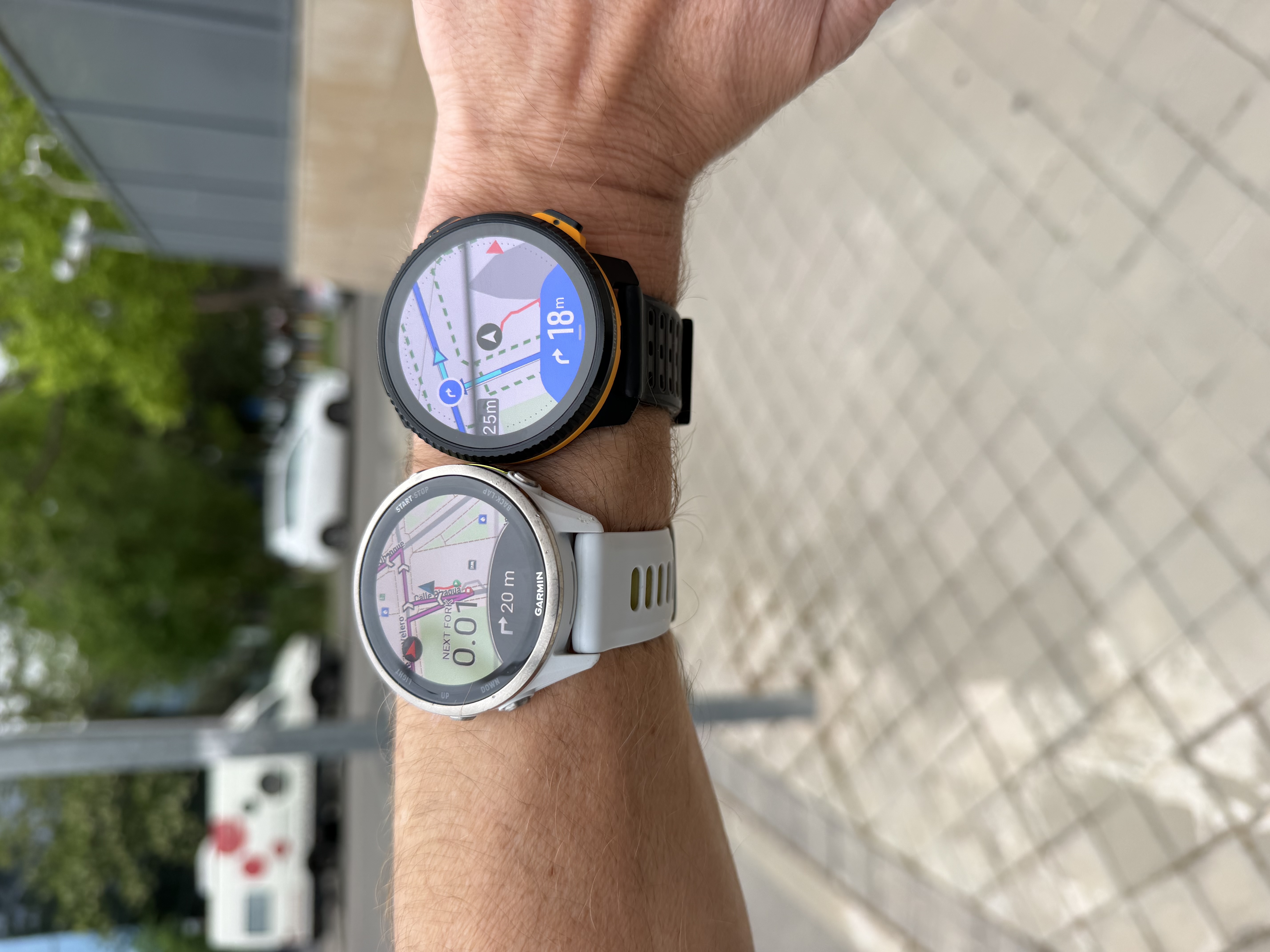
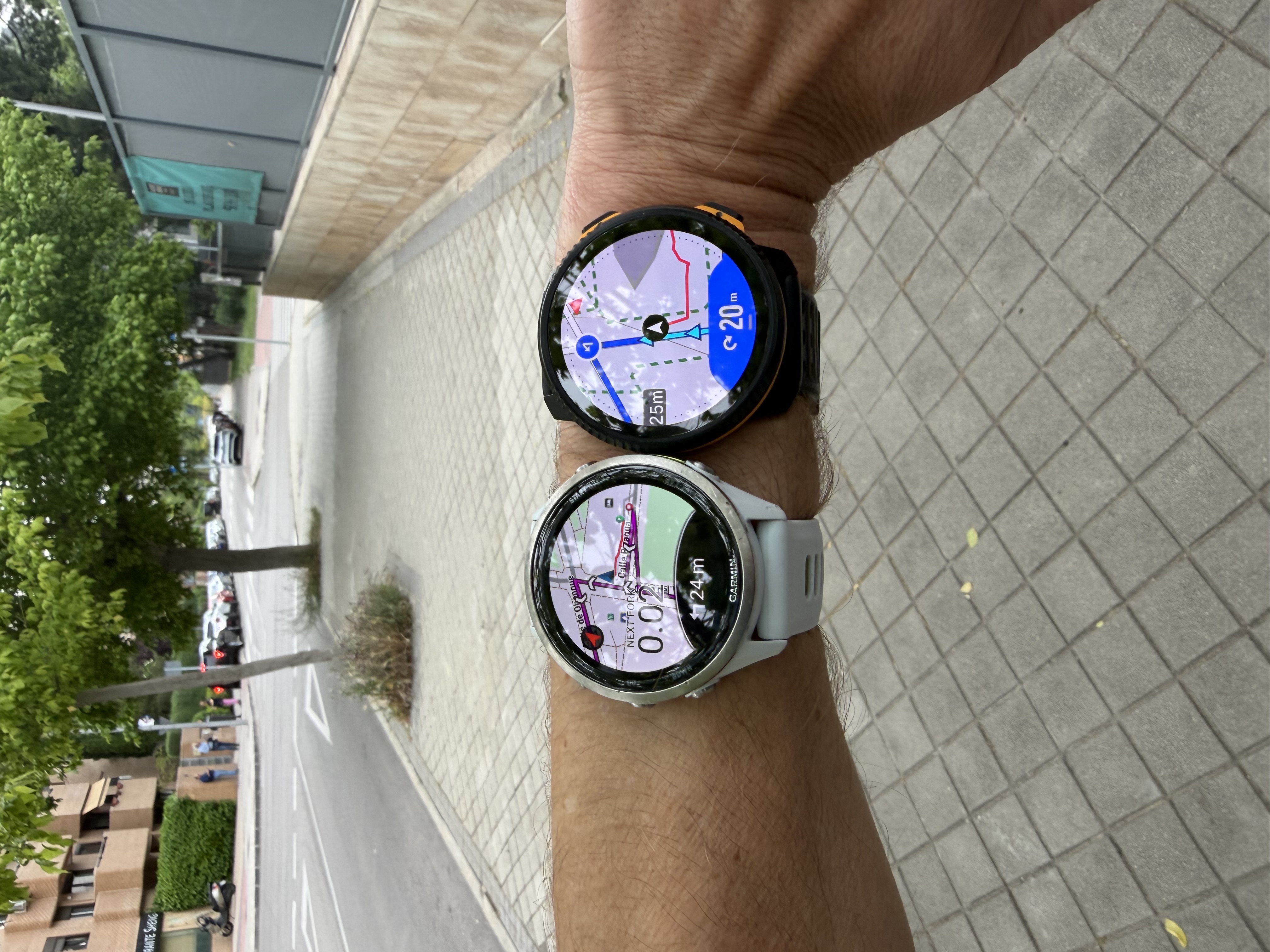
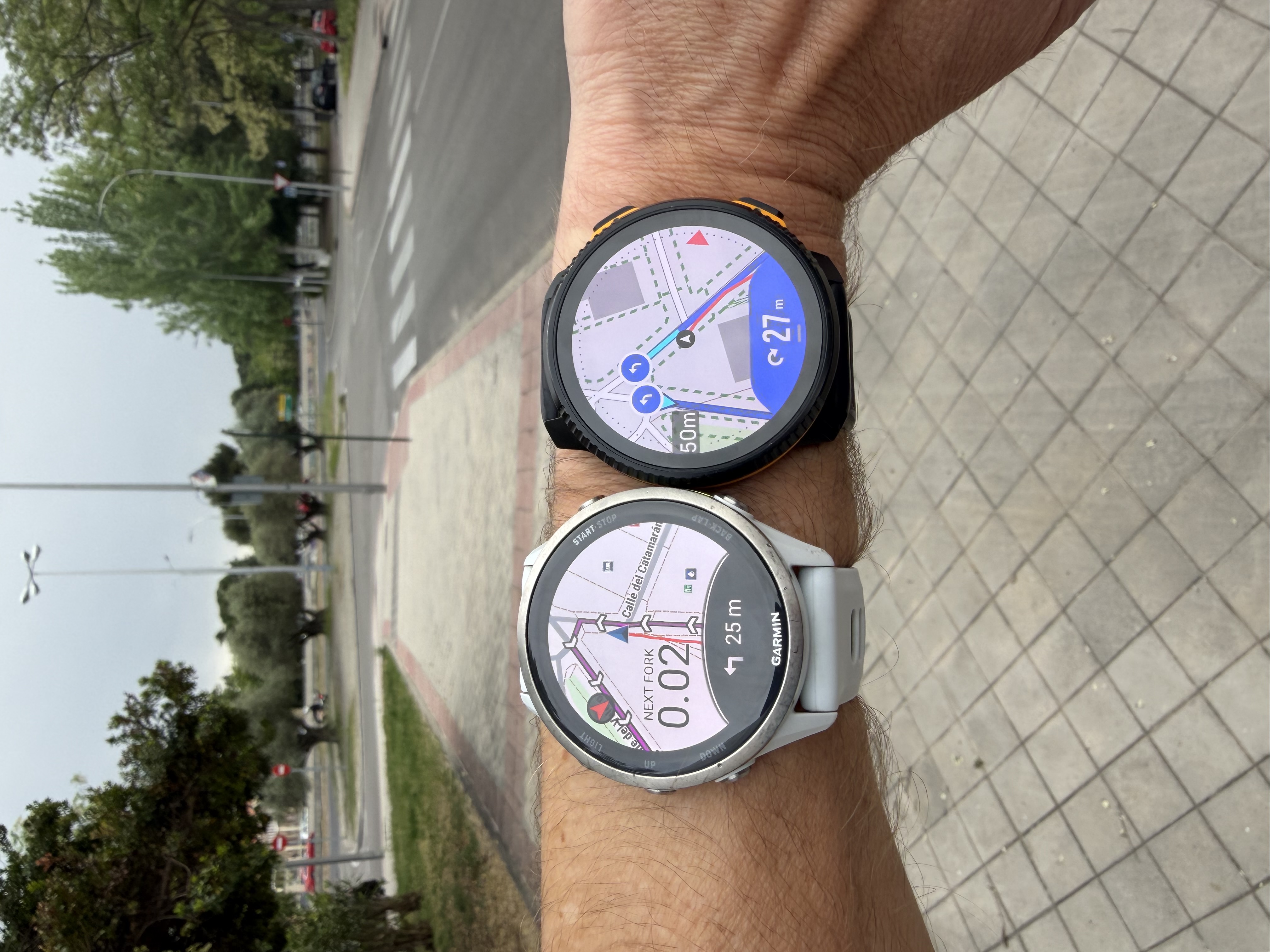
Garmin & Suunto
Very close overall. In the first two turns, a slight advantage for Suunto in terms of reactivity, and on the last one, Garmin was slightly ahead.
Technical & Product Specialist – Suunto Iberia
-
COROS & Suunto
On the third turn, which is the only one COROS detected among the first three, it clearly triggers earlier. The turn is indicated when I’m still around 15–20 m away, as you can see in the track displayed on the map.
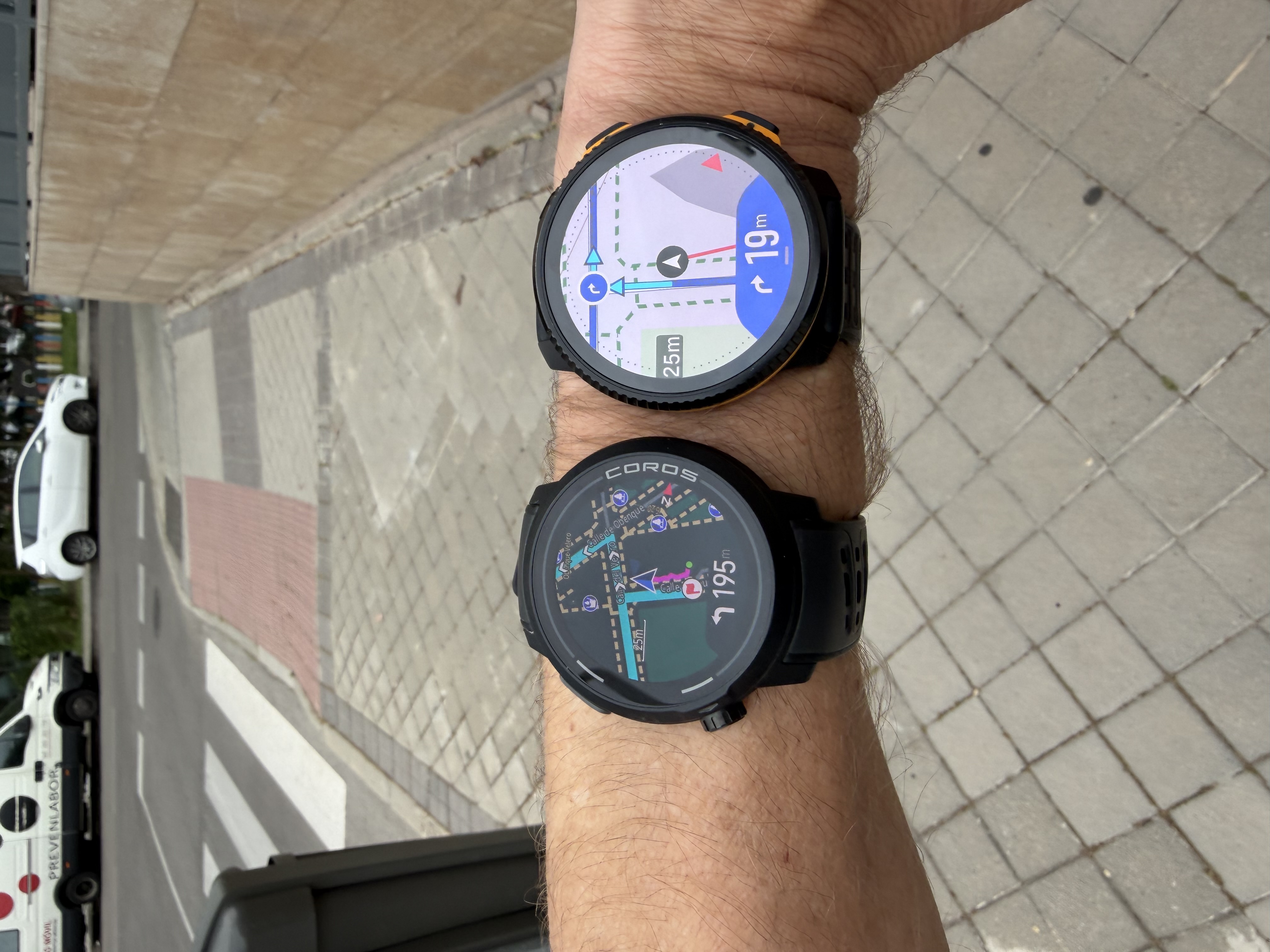
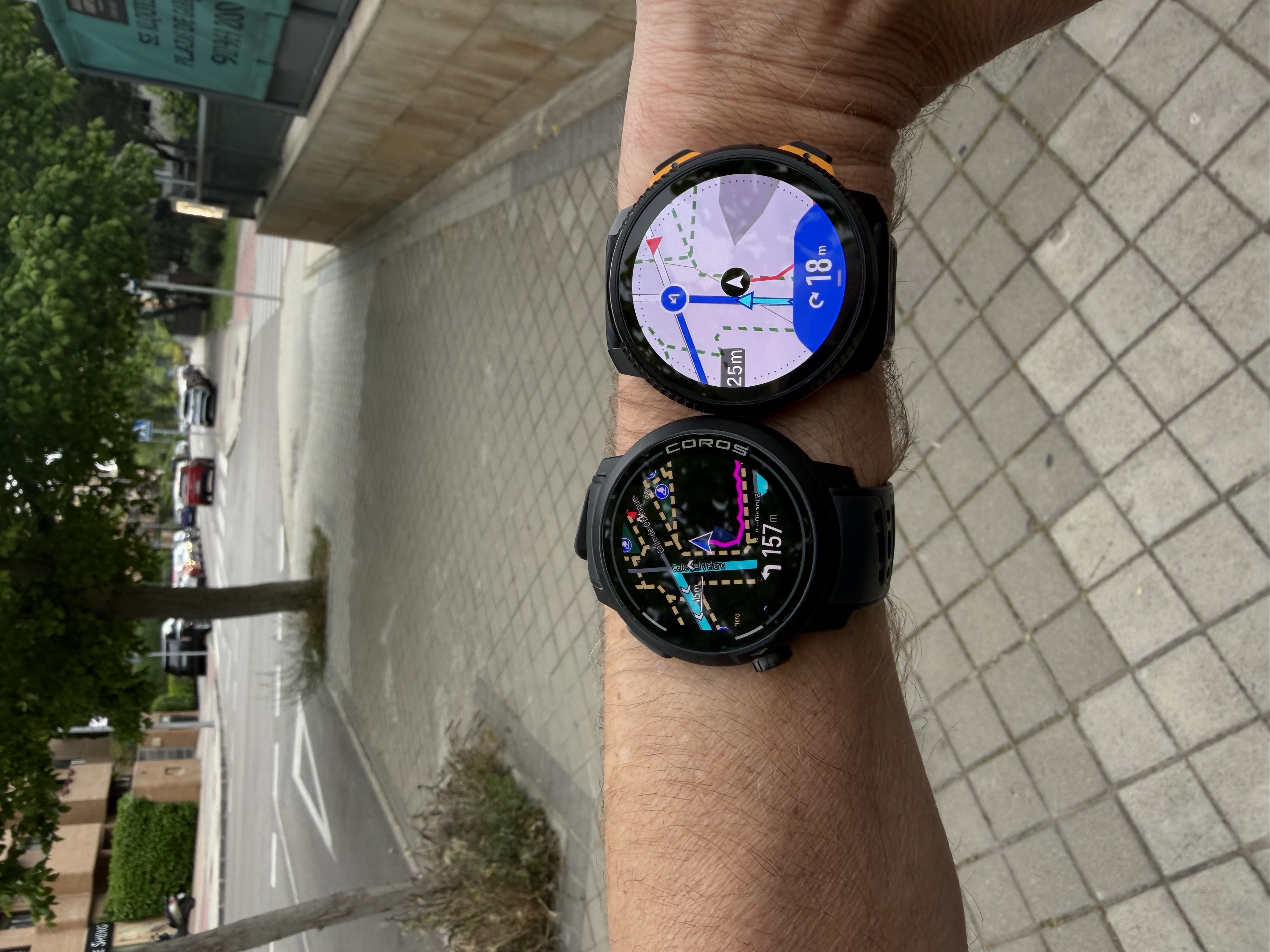
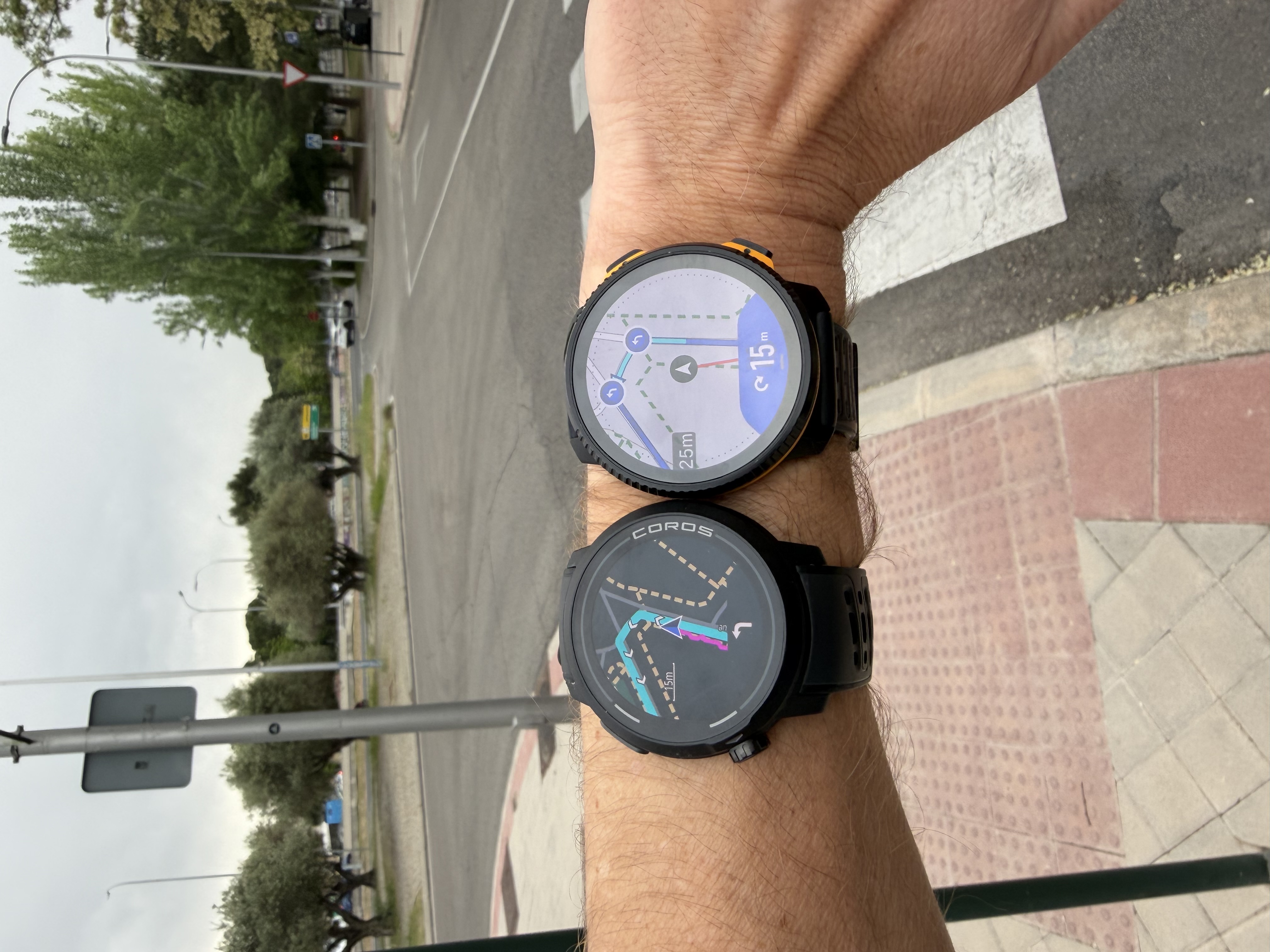
Amazfit & Suunto
Amazfit consistently triggers earlier on each turn. As shown in the images, the turn notification appears significantly before reaching the actual turning point.
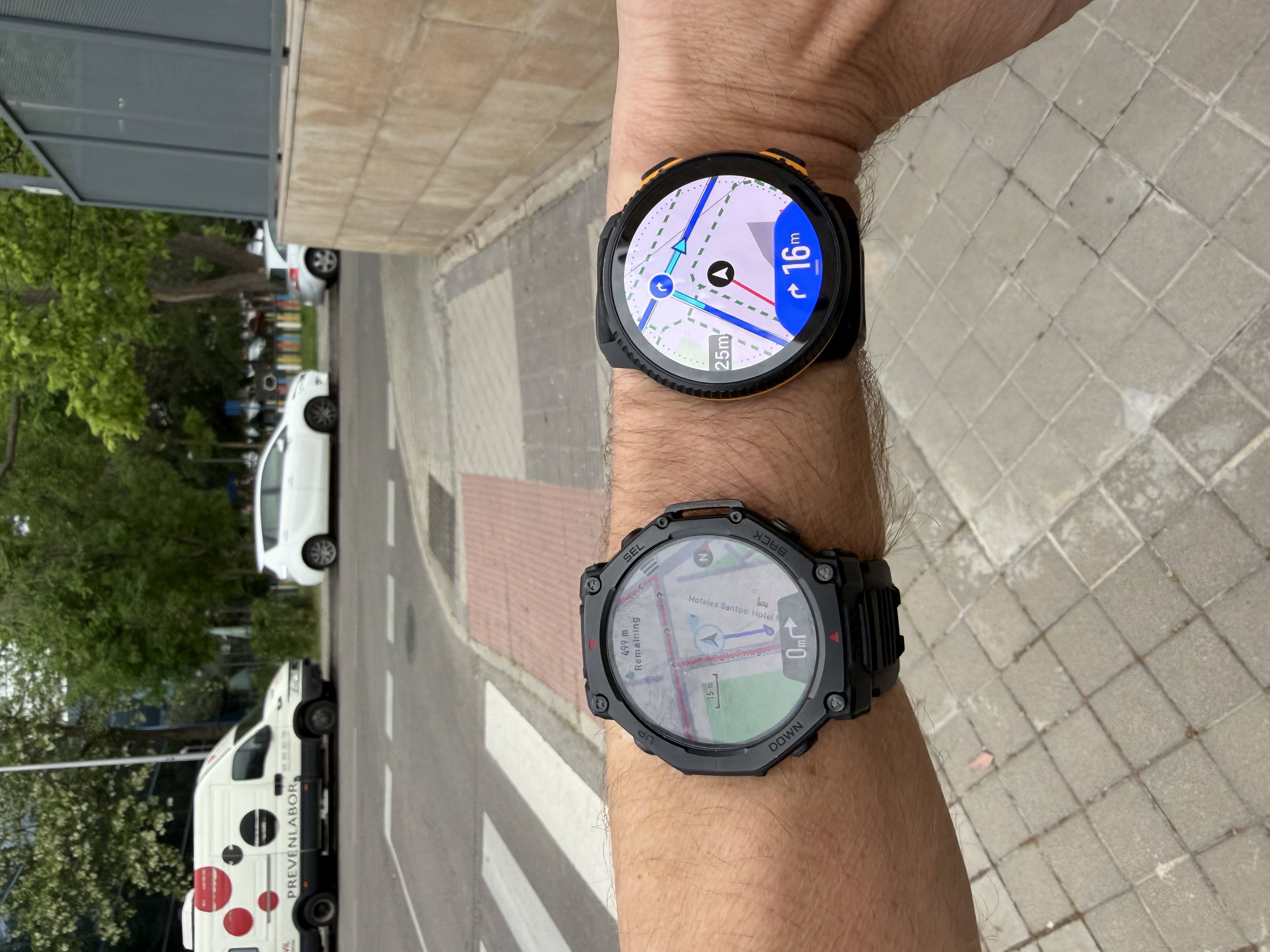
Final conclusion
That said, YOU CAN PERFECTLY FOLLOW TURN-BY-TURN NAVIGATION WITH ANY OF THE FOUR WATCHES.
From my experience, Garmin and Suunto are quite similar in terms of turn reactivity and distance to turn when routes are created manually in their respective apps.
As mentioned, this will depend on the platform where the route is created, and of course your experience may vary. I’m simply sharing my tests across different locations.
We will of course continue working to improve this for all users, which is why this kind of feedback is very valuable. Thank you very much!
-
@Joaquin Looking at the watch photos - why does Suunto not pointing to the left next to the distance remaining in the 2nd and 3rd photo? It’s counter intuitive, isn’t it?
Race S
-
@2b2bff said in Several navigation issues (feedback):
@Joaquin Looking at the watch photos - why does Suunto not pointing to the left next to the distance remaining in the 2nd and 3rd photo? It’s counter intuitive, isn’t it?
This is the display, when the next turn is not within notification distance. Then it is basically a generic icon for this data field how far the next turn is.
I also think the actual direction could be shown in this state. No idea if this will come later. -
@2b2bff We don’t have a dynamic icon in the data field that shows the turning direction; we’re working on it, and it’s something I’d love to have. The correct turn signal appears after 20 meters.
-
@Joaquin I think I have found the issue.
First, I’d like to thank you for taking the time for the tests and the very detailed post.
After looking at your track, I have just realized that my track is a roundtrip track, and means the same way out and back. This is something that I always do by default when I test the navigation.And that track it also means that in the way out (going up), I also take a fork that I repeat in 2 directions and then return to the track up to a mountain. In the way back (and going down) I take the same fork doing the same repeat and then return to the track. Or sometimes I take a completely different fork, and then I return to the track.
I have tested this convoluted track in every brand of the market but Polar. And the reason is that in short trail runs or in very fast ones, sometimes you repeat parts of the tracks and knowing your watch has strong and reactive indications is interesting.
For this same reason, specially in very technical paths, is interesting to have the audio navigation indications (that can enabled/disabled with just a trigger in the navigation options of the watch for most brands of the market). About this, Garmin has audio prompts for even roundabouts.
Said this. I went for an small walk to show you what I’m seeing
Have a look at this shot: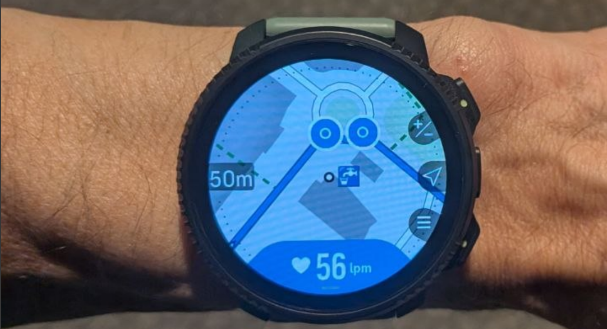
As you can see, there are 2 notifications for the roundabout (the way out, and the way back). When I arrive (way out, first time) to the roundabout, and when I’m almost at the roundabout, the watch is saying that there are still 18 meters left, and that’s impossible. There are perhaps 18 meters but to the point of the other notification (that should be triggered when you are back), not to the first one
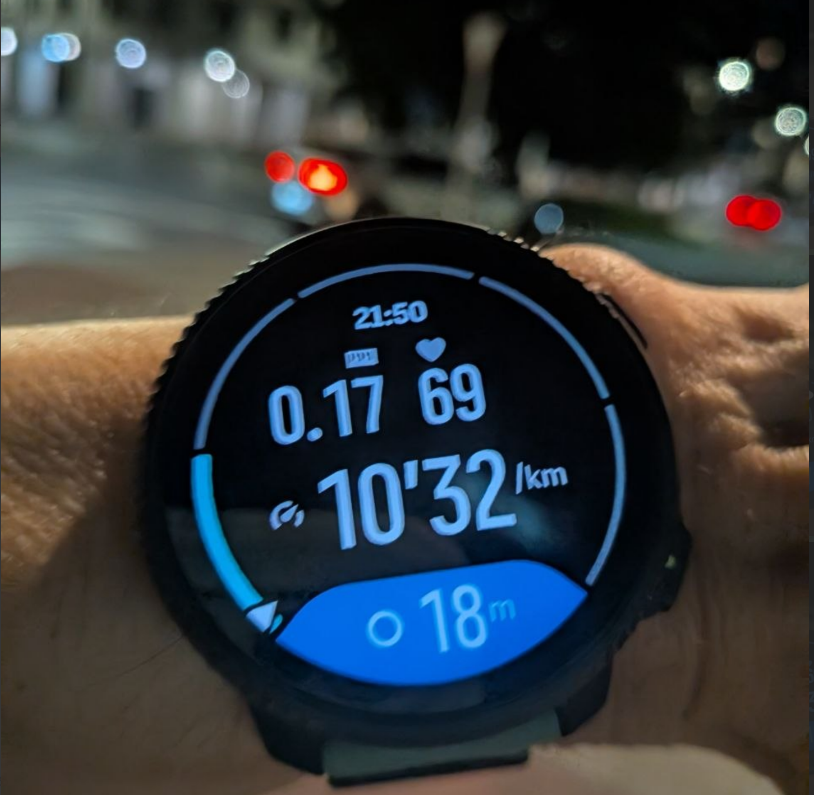
- Is it possible the watch in this roundtrip scenario is notifying the second notification, instead the first one?
Then, I walked like 300 meters and I turned back and I did not got any roundabout notification again (this works in Garmin). I think the autoreverse is not as reactive as it should be, as I was explaining.
But this is today with an extremely small test as it’s very late now here. If a run a lot longer, I have the feeling that the watch is giving notifications inside the turns and the notifications sometimes remain after those turns. And despite the notifications are ok, and in the corresponding direction, I think there’s something very strange with the distances and response time in this roundtrip scenario.
The track I’m using means also a check that enables the roudtrip inside Komoot.
Could you test a roundtrip scenario (way out and back using the same way)?
BTW, only Garmin and Suunto can notify roundabouts and forks. And I have even seen the go straight in a fork in Suunto (not only take the fork) so this is very nice (Coros and Amazfit only notify the turn left-right and Amazfit even misses several forks, if not most). I don’t understand why you are getting that “0 meters” in all the shots in Amazfit. As far as I remember, the Ultra 2 was accurate with the distances in my tracks. But I wouldn’t be surprised if they have broken something in their very last updates (which I have not tested). And in any case, that is not our problem here.
I think that in this roundtrip scenario, Suunto has something strange here. Perhaps is something that happens where I live or in my tracks, but the thing is that I only see this discrepancy with the accuracy in responsiveness and distance in Suunto (and in this roundtrip scenario).
Suunto Vertical 2 Titanium Sage, Suunto Run
-
@Joaquin I’ve noticed that turn icons (symbols) are incorrect at the bottom Suunto map screen on the 2nd and 3rd pictures. The icons seem to indicate sharp right turn if I interpret them correctly while in fact there are left turns in both cases.
Edit: I see that this has already been answered above.
-
@dreamer_ Thanks a lot for the very detailed feedback, really appreciate the time you took to explain and test this scenario.
If possible, could you please share a full screenshot of the route you are using (showing the complete roundtrip)? I’ll try to reproduce it on my side.
That said, unfortunately I have Madrid Marathon and a Trail Camp with El Corte Inglés next week, so it might take me a bit longer than usual to properly test this. In any case, I will definitely pass this to the dev team if I’m able to reproduce the behavior you’re describing.
Regarding your findings, this could indeed be related to the auto-reverse logic. It’s great that the watch is able to adapt to the direction of navigation, but we introduced a safety threshold of around ~200m before switching direction. This is intentional, as switching too quickly could be problematic in some scenarios and we need to ensure the user has actually turned back and not just made a small deviation.
Because of this threshold, if there is a turn event within that ~200m window after changing direction, it’s possible that the watch could still be “anchored” to the previous direction and therefore confuse turn events, like in your example.
That said, I believe these are quite specific edge cases, and in most normal navigation scenarios this should not be noticeable.
Also, currently turns are handled with two different behaviors:
- Autozoom → the map zooms in advance when approaching a turn
- Turn notification → triggered around ~20m before the turn
And I agree with you here: depending on speed, 20m can sometimes be too short.
We are currently working on unifying both behaviors, so turn notifications will be driven by a more dynamic threshold (similar to autozoom or off-route logic), which should provide more consistent and earlier alerts regardless of speed.
Again, thanks a lot for the feedback
 ️
️
BTW, I also personally really like the idea of having a microphone and speaker. However, this is handled by our product team, and currently it introduces trade-offs with the barometer performance, which is critical for us. Hopefully we can find a good balance in future generations without compromising barometric accuracy.
-
@Joaquin sure.
This is the usual route for these testings (re-uploaded with better quality)
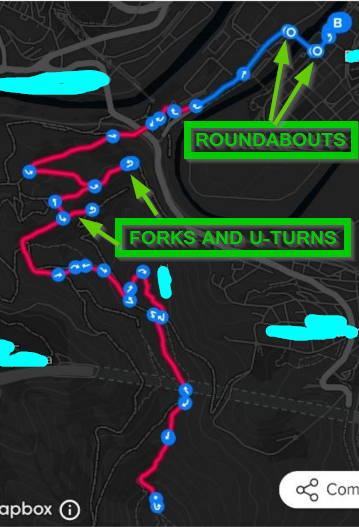
The track is roundtrip: Up (with 2 additional forks) to the top of a mountain, and down repeating everything again
Notifications mostly work in both directions. It’s just about the accuracy of them, remaining the notifications inside and after the turns (refer to my previous post with the shots of the very first roundabout)
About the microphone/speaker, I was only speaking about the audio navigation notifications since this thread is about navigation thinking in the use of the headphones (I.E, the Garmin Instinct 3 does not have a microphone or speaker but has audio notifications through the headphones (and that watch is able to even notify the roundabouts and despite It can’t show the maps). Suunto has already invested in the engineering of very nice headphones and with very interesting products that are already in the market (like the Spark). I think that with several software updates (both watch and headphones), those kind of products could be used as a very nice marketing thing (for something like an “ecosystem”). I’m thinking also in running indoor or treadmill when there’s no GNSS signal.
But this is another topic, just to explain It further (and also to say that you already have the microphone and speaker in the market that could be used to go further). In my opinion, optional audio navigation notifications are sometimes incredible useful.Thank you so much
-
@joaquin there’s definetely a bug here, and I found the explanation.
I made another experiment. If inside Komoot I don’t check the roundtrip, it does not make any effect , since the route is roundtrip (or at least, I can see indications in both directions despite of that)
But it is more. It’s Komoot what is making the bad turn-by-turn directions. Have a look at this photo:
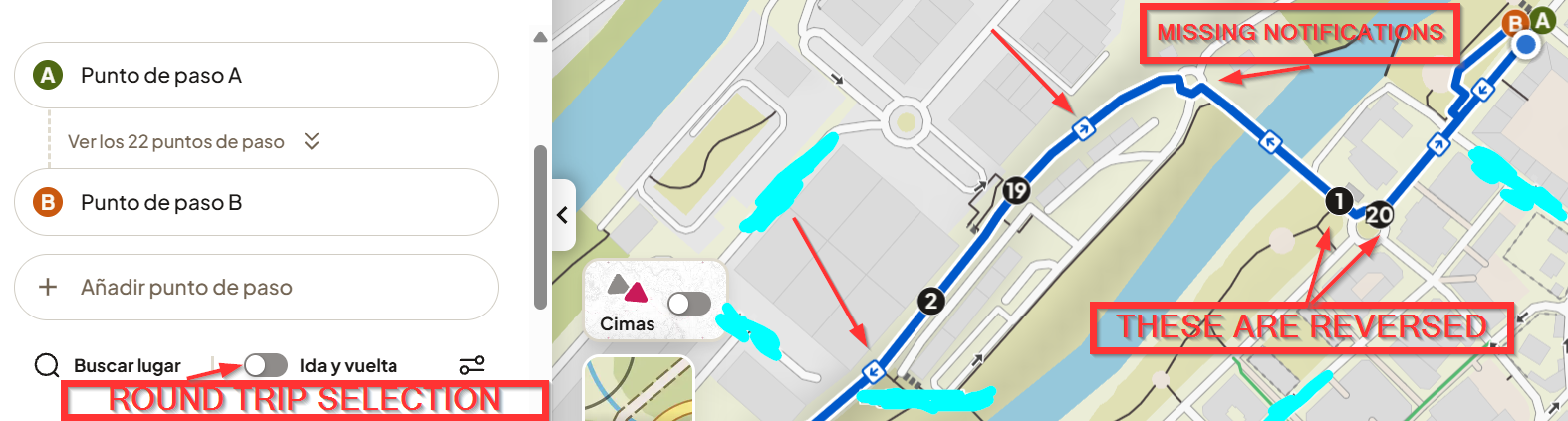
A: Start point
B: End point of the routeWhat you see in the photos I posted in the other post is that Suunto is notifiying that 1 as the very first point, because of Komoot’s issue. That’s why there’s the 18 meters offset in the photos I posted for you.
So offset explained.
Now, about the photos you uploaded.
Photos 2,4,3,5. Suunto’s notifications seem to be wrong and that is a one-way track (no roundtrip).What I’m seeing (3 and 5) is that there are several turns close together. It’s like there is something bad at the algorythms, detecting 2 very close left turns as an U-turn. Perhaps this is Komoot related.
What happens when turns are very close inside Komoot?In my opinion, it’s very clear Komoot’s workaround is more a problem, once we know others are not having these kind of issues.
-
Today, I repeated the whole track.
A shot inside a turn: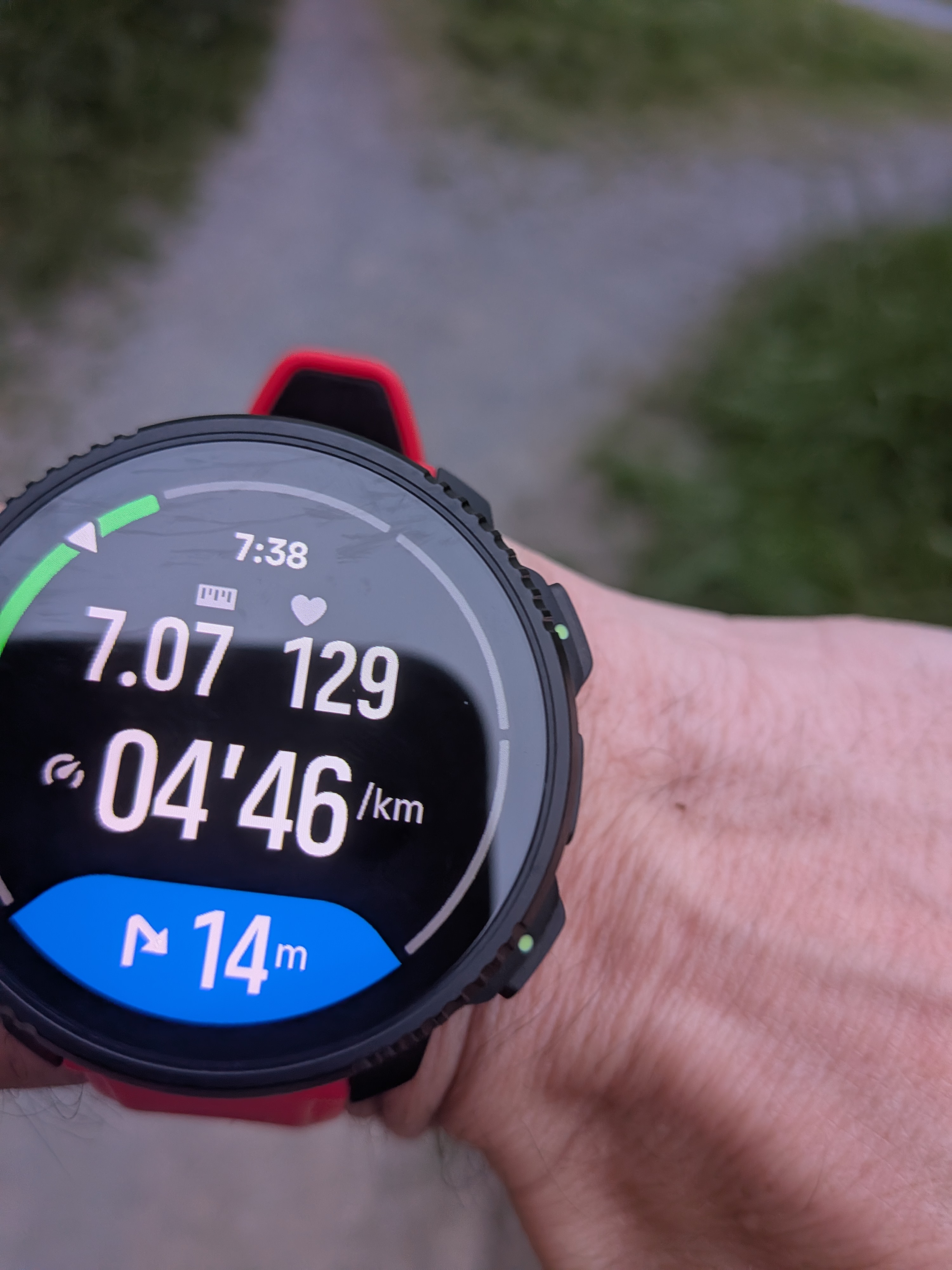
Another one:
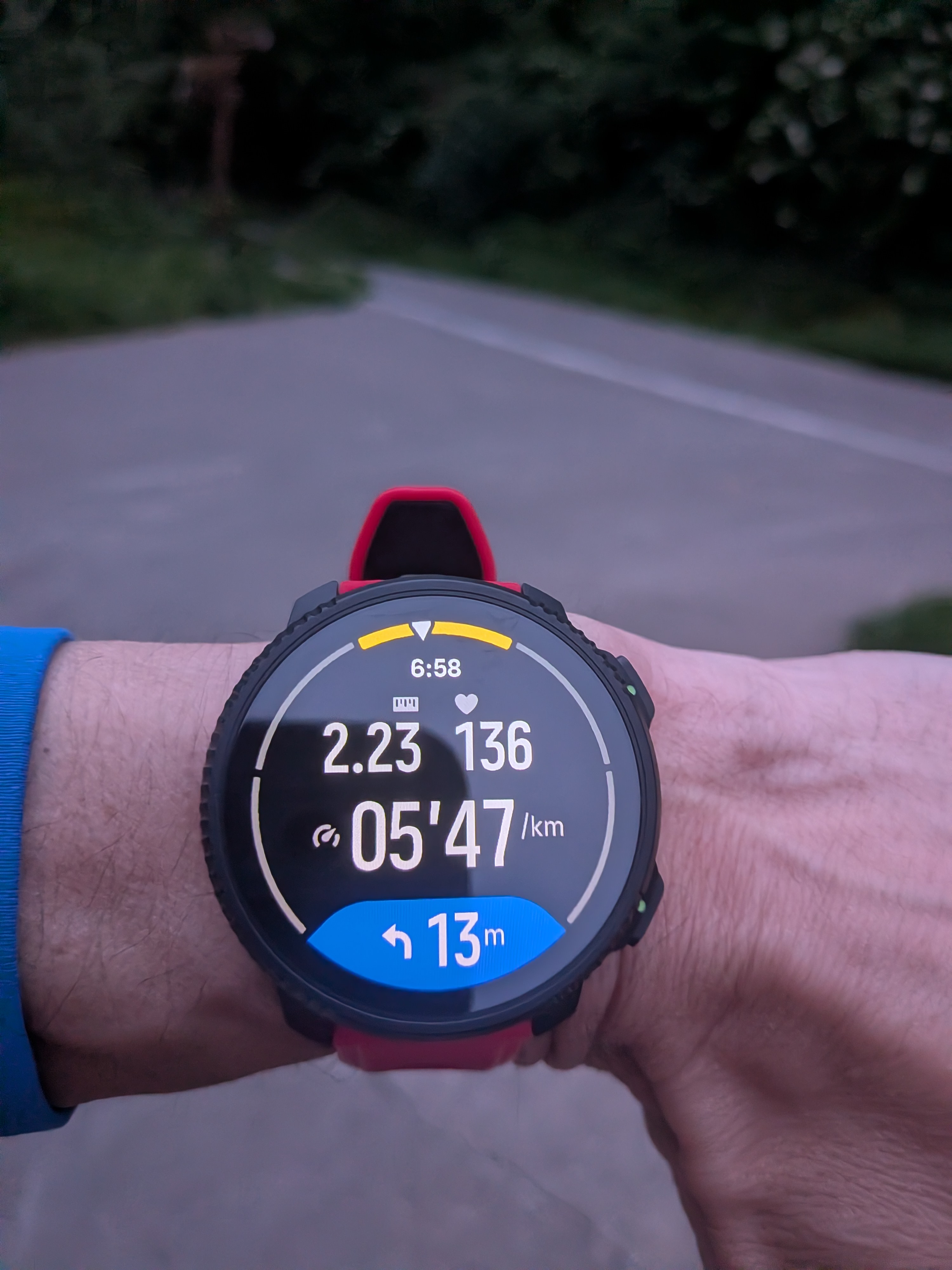
The offset issue is there all time. Worst thing seems this is caused by Komoot, not Suunto. And basically Komoot’s algorythms are not as strong as other’s (which is bad for Suunto).
And, I also got:
- 2 false out of the route. One was at the top of the last hill/mountain. Notifying a 30m offset.
- False incoming climbs notifying a down when I was going up and also an up notification when I was going down. The first one was near the end of the last climb.
As explained before, I have the feeling that autoreverse needs some serious work too because of the lost turns.
Suunto Vertical 2 Titanium Sage, Suunto Run
-
Just a note:
If I create a route in the Suunto app or the Suunto Route Planner, the turns are announced correctly, about 20 meters before the turn. If I create a route in Mapy .com, the turns are announced with a delay, usually exactly at the point of the turn. I dont have Komoot.Suunto: Ambit 3, Spartan, Vertical 2
Garmin: FR 405, 935, 970 , Fenix 3, 6X, Epix2 Pro -
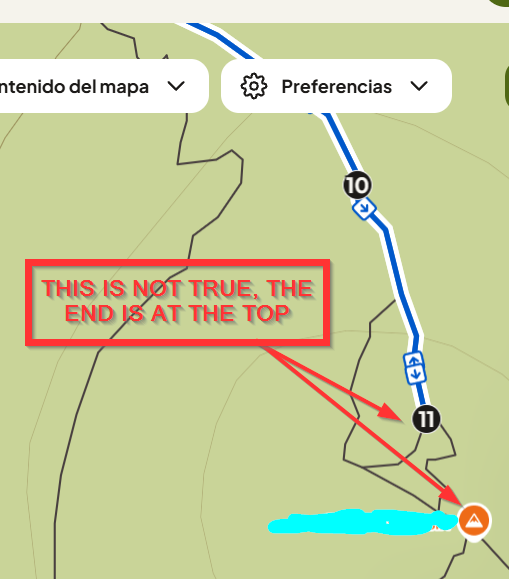
Explanation of one of the “Out of the route” . It seems an issue generated by Komoot:
Track inside Komoot:
Track inside Garmin Connect:
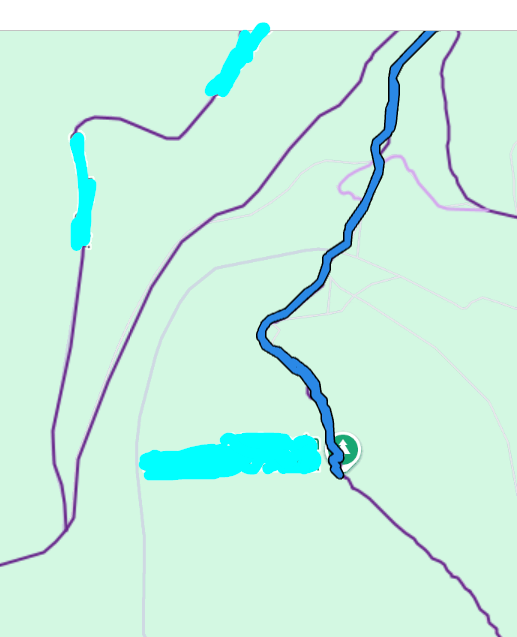
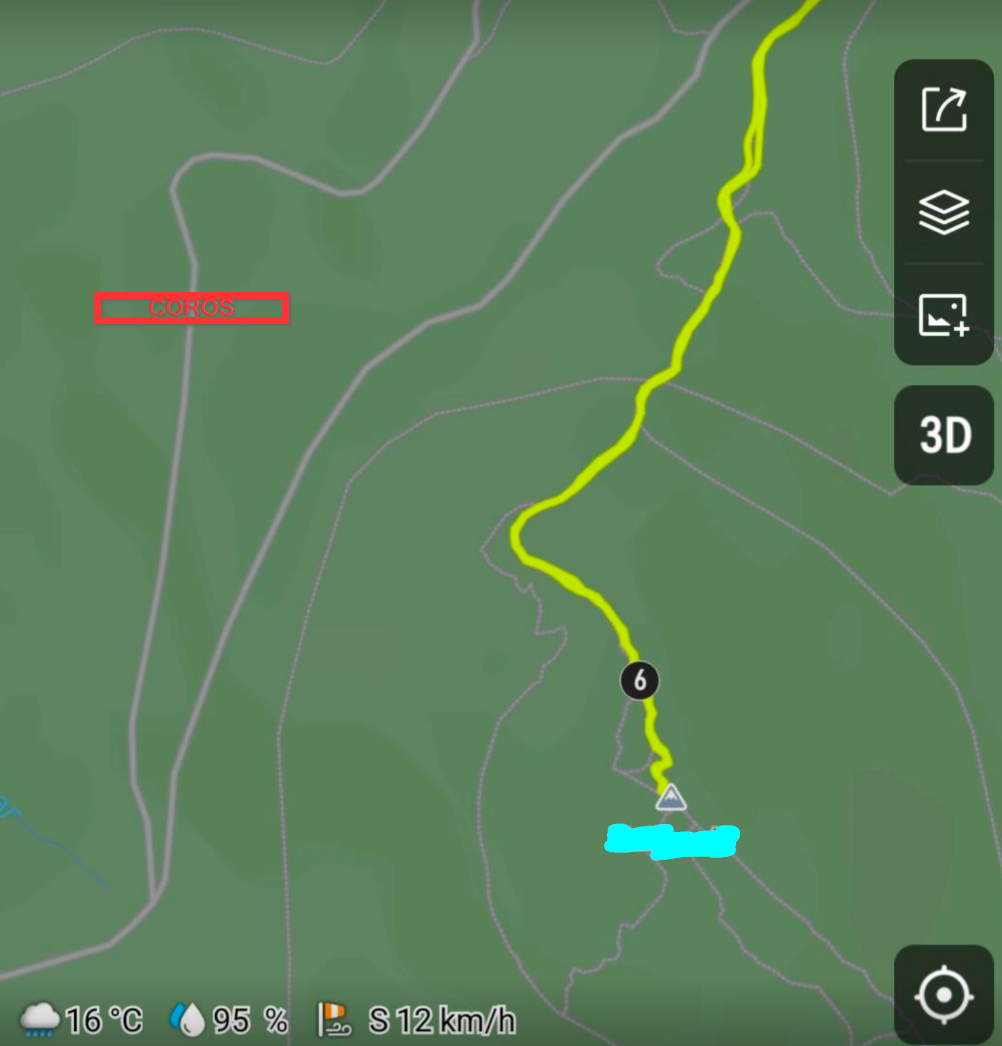
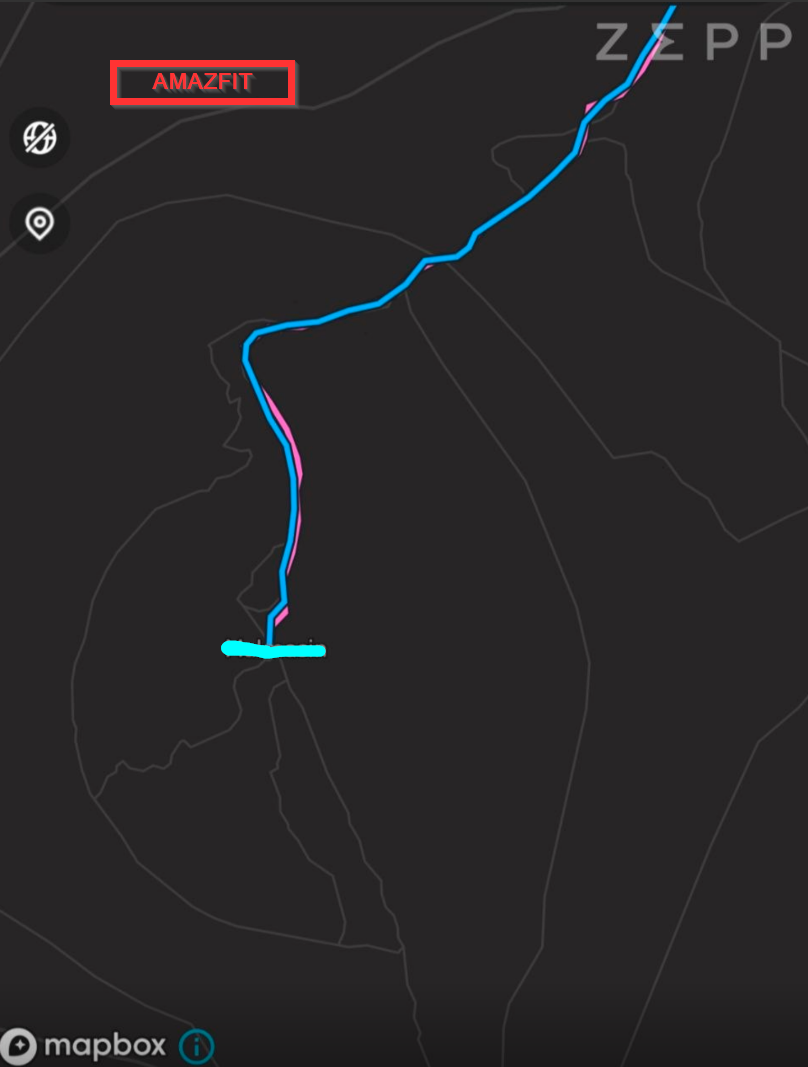
I have never finished that route where Komoot is saying, I allways finish at the top (as you can see in Garmin Connect’s track).
- It does also explain the last bad climb guidance notification. The watch triggered a downhill pop-up, but I was going up (the track was not finished yet).
- It means the Komoot workaround does not only affect to the turn-by-turn notifications, but ALSO to Climb Guidance.
Needless to say that, despite I had tested this track in Coros and Amazfit, I have re-uploaded the same track to Coros and Amazfit to be sure. This issue is only in Kommot.
Coros:
Amazfit:
Another thing:
- The shot with the track I uploaded yesterday here:
https://forum.suunto.com/topic/15071/several-navigation-issues-feedback/39
In the first fork (of those 2), I noticed I have reversed Climb Guidance notifications (uphill when it should be downhill and downhill when it should be uphill). Those 2 small forks, are basically 2 slopes with a final U-turn. I understand it is very likely this issue is (again) caused by Komoot, since it’s Komoot who is creating all the logic that Suunto uses for the turn-by-turn directions and Climb Guidance.
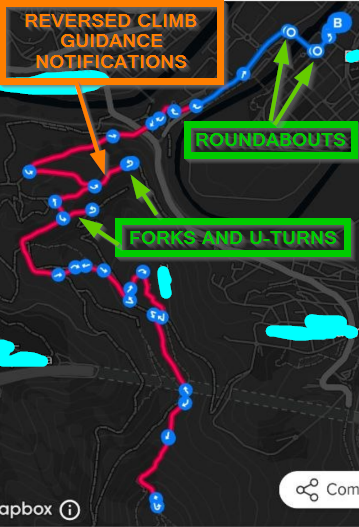
What I don’t understand how is it possible I’m finding these kind of issues.
If Komoot is not accurate, will Suunto have the Komoot approach forever?




Hello! It looks like you're interested in this conversation, but you don't have an account yet.
Getting fed up of having to scroll through the same posts each visit? When you register for an account, you'll always come back to exactly where you were before, and choose to be notified of new replies (either via email, or push notification). You'll also be able to save bookmarks and upvote posts to show your appreciation to other community members.
With your input, this post could be even better 💗
Register Login