[Question] No stupid questions - ask anything here
-
@Thibault-B. Are you absolutely sure you have touch enabled? Sounds like you are doing an exercise which has the touch options ‘Map Only’, ‘On’ or ‘Off’ and yours is on ‘Map Only’. You can switch it to ‘On’ either via ‘Exercise options’ before starting the exercise or by holding the down button during the exercise to open the control panel.
And just for clarity, this works on the original Race:
<uiViewSet id="uiViewSet1" onTap="$.put('/Zapp/{zapp_index}/Event', 2, null, 'int32')"
     style="top: 50%; left: 50%; width: 150px; height: 150px; background-color: red;">
      <div>lol</div>
      <div>lel</div>
    </uiViewSet>
function onEvent(_inp, _out, event) { if (event == 2) { next("#uiViewSet1", event); } }As an aside, this is also why using touch events is a bit problematic, since they often aren’t ‘On’ for many watch users.
-
@suuntopartnerteam I am working with a sprite map currently and have two approaches where I would need some guidance on:
Is it better to have a bigger sprite map with different permutations of individual elements or is it better to have a smaller map with each element as individual sprite but more
<img>tags in the HTML? -
Update: it works since new watch update (option to enable touch screen during activity).
@SuuntoPartnerTeam Thanks for your reply.
I tested your code in a fresh default project created from scratch. It works correctly in the simulator, but still not on my Suunto Race S.
I also reviewed the watch settings. The only options that seem potentially related to the touchscreen are “Do Not Disturb” and display settings (AOD, full wake-up), and both are configured correctly.
In my case, the touch event is not critical—it’s mainly a nice-to-have feature used to manually cycle through data, which already rotates automatically every few seconds.
-
@surfboomerang said in [Question] No stupid questions - ask anything here:
I’m trying to pass the default index of a uiViewSet like this:
main.js
function getUserInterface(input) {
  return {
    template: "t",
    uiViewSet:{index: input}
   };
}
This is assigning all input resource values (i.e an array) to
index, perhaps that’s not what you’re looking for? You could use an individual input or output value, e.g.:function getUserInterface(_input, output) { return { template: "t", uiViewSet: { index: output.index } }; }There also seems to be some string case conversion going on, I only get it to work if I use all lowercase
{zapp_uiviewset_index}in HTML.Perhaps the more standard solution in the previous answer is better, but using input or output values is also possible.
Also, if you return
uiViewSet:{index: input}, the minified JavaScript code will be:return{template:'t',uiViewSet:{index:input}}. This seems incorrect, becauseinputvariable doesn’t exist in the minified code. Maybe there’s no use case for this, but looks like a JavaScript conversion / minifier bug anyway. -
@Raimo-Järvi Nice find! Thanks for diving into this as well.
In the mean time I had to change some other code and the issue became obsolete, but I will definitly remember this in future projects. -
Hi.
Is there a way to obtain the GPS position using a input resource other than
/Navigation/Gps/Coordinates/{Filter}
which requires enabling navigation on the watch at the start of the exercise, something that’s not desirable for the app I’m developing?
Thanks.
Edit: That service provides the coordinates even if navigation is disabled. It’s possible that if navigation is disabled, it takes a few seconds to provide them, which is why my code failed as initially written.
-
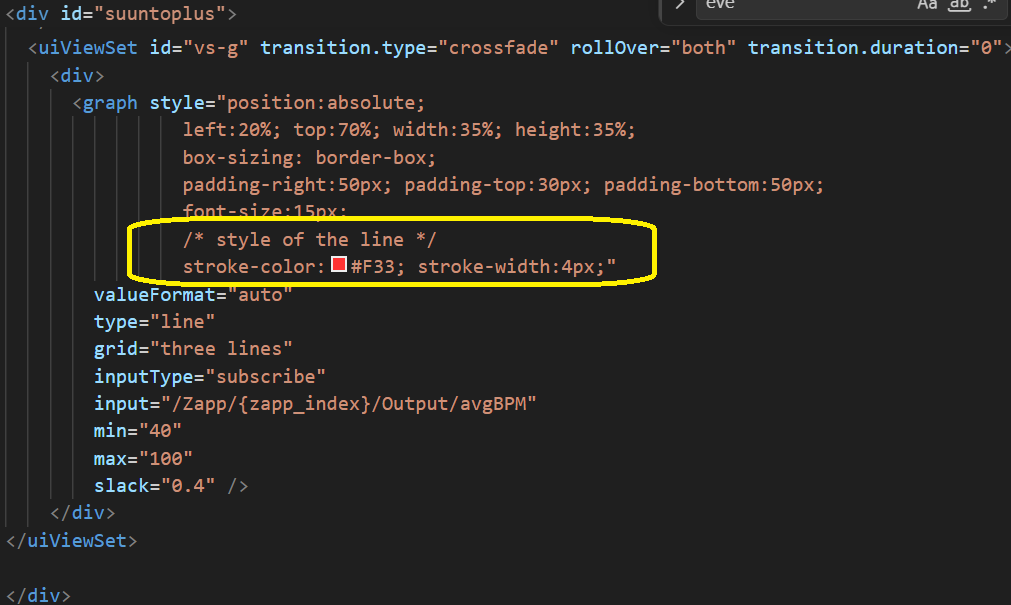
@Tomas5 the only diff is see between us is the stroke color. maybe default is black so you don’t see it?
-
2 questions regarding Settings
-
How can a user approach my app’s seetings if i bypass the suuntoplus app? (i deploy directly…)
-
and another settings question:
on vsCode i wish to keep a setting value for the next time, so , as a test to see if it works i do:
var loadSettings = function(input, output) {
settings = localStorage.getObject(“appSettings”);
settings.active++;
if (settings == null) {
settings = {
maxPace: 12,
timelapse: 123,
active: 0
}
}
localStorage.setObject(“appVariables”, settings); //save
}so i’m advancing ++ and saving.
- on vsCode indeed it works (i added debug on UI to view value), but on my watch it stays 1…
ideas?
-
-
@assaf1007 said in [Question] No stupid questions - ask anything here:
How can a user approach my app’s seetings if i bypass the suuntoplus app? (i deploy directly…)
You can use a “data.json” file to enter the settings. Is that what you’re looking for?
-
@assaf1007 thanks it helped, in simulator line is always blue regardless storke color, but in watch it needs defined stroke-color to work properly.
-
@surfboomerang i’m using data.json and may use its values inside the .js file
but i wish to be able to set values at the watch itself (if possible), not at vsCode or suuntoplus app.
imagine a co2 table (for freedive practice) where user must set specific personal values.- in such case, i need (= user need) some kind of a preliminary UI (before app starts) to be able to update settings…
-
@Dimitrios-Kanellopoulos Hello, should the BLE-connection system in the SDK also work in the simulator on windows?
-
@brechtvb no BLE works only on the physical wacth
-
@suuntopartnerteam or others, I have a few questions:
-
type=“subscribe-when-shown” in an eval.
– Is it more efficient when the related subscribed information is not displayed? -
I do not find the setting to enable touch screen on Suunto Race S. It is also disabled in menu to select end of workout. -> Solved since new watch update which provides this setting.
Thanks.
-
-
Hi, I tried to get offline maps data from some Caribbean islands but I cannot get them from the maps download. I was looking for st. Maarten or Saba for example. Can these maps be added to download please? They are visible on the maps itself, but not as offline map.
-
Does anyone tried to display array of values in <graph> element? I tried output array as variable and show it in graph using get compilation type but i am not suceasfull yet.
-
I try to get thedistance, bearing and coordinates of a POI
For the distance I use “/Navigation/Poi/Active/Distance” which indeed returns the distance.
For coordinates I try to use “/Navigation/Targetlocation/Coordinates”. This works in the simulator but no results on the watch
For bearing I use “/Navigation/Targetlocation/Bearing” which is undocumented, but suggested by the intellisense. This one also doesn’t report any values.Is it possible to get the bearing and coordinates of a selected POI?
-
@assaf1007 You are using two different strings for
getObjectandsetObject.This should be a minimal working example which pushes
settings.activeup by 1 whenever you start an exercise:var settings = null; function onLoad(input, output) { settings = { maxPace: 12, timelapse: 123, active: 0, }; loadSettings() } var loadSettings = function () { var loaded = localStorage.getObject("appSettings"); if (loaded != null) settings = loaded; // else localStorage.setObject("appSettings", settings); settings.active++; localStorage.setObject("appSettings", settings); }; function evaluate(_inp, _out) { setText("#active", String(settings.active)) } function getUserInterface() { return { template: 't' }; }and the html:
<uiView>
  <div>
    <div id="active" class="p-m">
      0
    </div>
  </div>
</uiView>
So:
but i wish to be able to set values at the watch itself (if possible) … in such case, i need (= user need) some kind of a preliminary UI (before app starts) to be able to update settings…
Possible indeed! The ‘tennis score pro’ application has a start screen which saves the settings for the next time.
-
@suuntopartnerteam maybe not a stupid question, but is it possible to add two icons (a left and right arrow) to the f-ico classes in the style of F266 and F267? I was looking for something similar, but I wasn’t able to find it so I’ve just used F394 and F402 for now.
-
Hi everyone,
I have a quick question regarding BLE connectivity that might save me (and hopefully others) some time and unnecessary experimentation.
I’m currently working on a small add-on that retrieves and displays data from an external third-party device via BLE. Thanks to the documentation, I’ve already built a basic prototype that proves the core concept works.
However, I’ve hit a roadblock: the external device requires a PIN to establish a secure Bluetooth connection. When testing with devices that don’t require a PIN, the connection works flawlessly.
My issue is that I cannot find any mention in the documentation on how to explicitly handle PIN entry during the pairing process.
Does the current Suunto SDK support manual PIN entry pairing? If so, could someone point me toward the right methods or a code snippet?
Any insights would be greatly appreciated!






Hello! It looks like you're interested in this conversation, but you don't have an account yet.
Getting fed up of having to scroll through the same posts each visit? When you register for an account, you'll always come back to exactly where you were before, and choose to be notified of new replies (either via email, or push notification). You'll also be able to save bookmarks and upvote posts to show your appreciation to other community members.
With your input, this post could be even better 💗
Register Login