Sleep widget not working properly on Vertical 2
-
@itoakio Suunto development knows about it. It is an iOS issue only.
Here is a workaround I can share:
You need to reset the bedtime schedule by following the steps below:- Forget the device in the app
- In Sleep Goal, set the bedtime schedule to 22:00–08:00. (training zone > Recovery> Scroll to bottom >Daily Sleep Target)
- Reconnect the device.
-
@Egika so you just disconnected from the App and Changed the sleep schedule to the factory times and all locked in? Or did it change over night to the correct day? Also, is it possible to downgrade firmware to the last where sleep was working, waiting for a hotfix (hopefully)?
-
@Egika thank you. There has just been an iOS app update to 3.7.1, however this does not fix the issue either. I also tried what you suggested (forget device, re-set sleep values, re-connect), however with no change, either. So let’s hope Suunto team can fix this with their software team.
-
@Egika, thank you! Will try it.

-
@mountainsdudeshikes said in Sleep widget not working properly on Vertical 2:
@Egika so you just disconnected from the App and Changed the sleep schedule to the factory times and all locked in? Or did it change over night to the correct day? Also, is it possible to downgrade firmware to the last where sleep was working, waiting for a hotfix (hopefully)?
I did not have this problem. This is the workaround the developers sent to me and I am allowed to share it. I would think it is supposed to work from the time you do these steps, not changing past data.
Cheers -
@Egika Ok, thanks. Did that. Curious about tomorrow morning, but I’m starting to doubt there will be a solution.
 Really not sure about returning the device, its so frustrating with sleep, all other things are so nice and fit my lifestyle really well…
 -
@Egika said in Sleep widget not working properly on Vertical 2:
Here is a workaround I can share:
You need to reset the bedtime schedule by following the steps below:- Forget the device in the app
- In Sleep Goal, set the bedtime schedule to 22:00–08:00. (training zone > Recovery> Scroll to bottom >Daily Sleep Target)
-> the second step I personally cannot fully follow as I have only sleep duration, not times… - Reconnect the device.
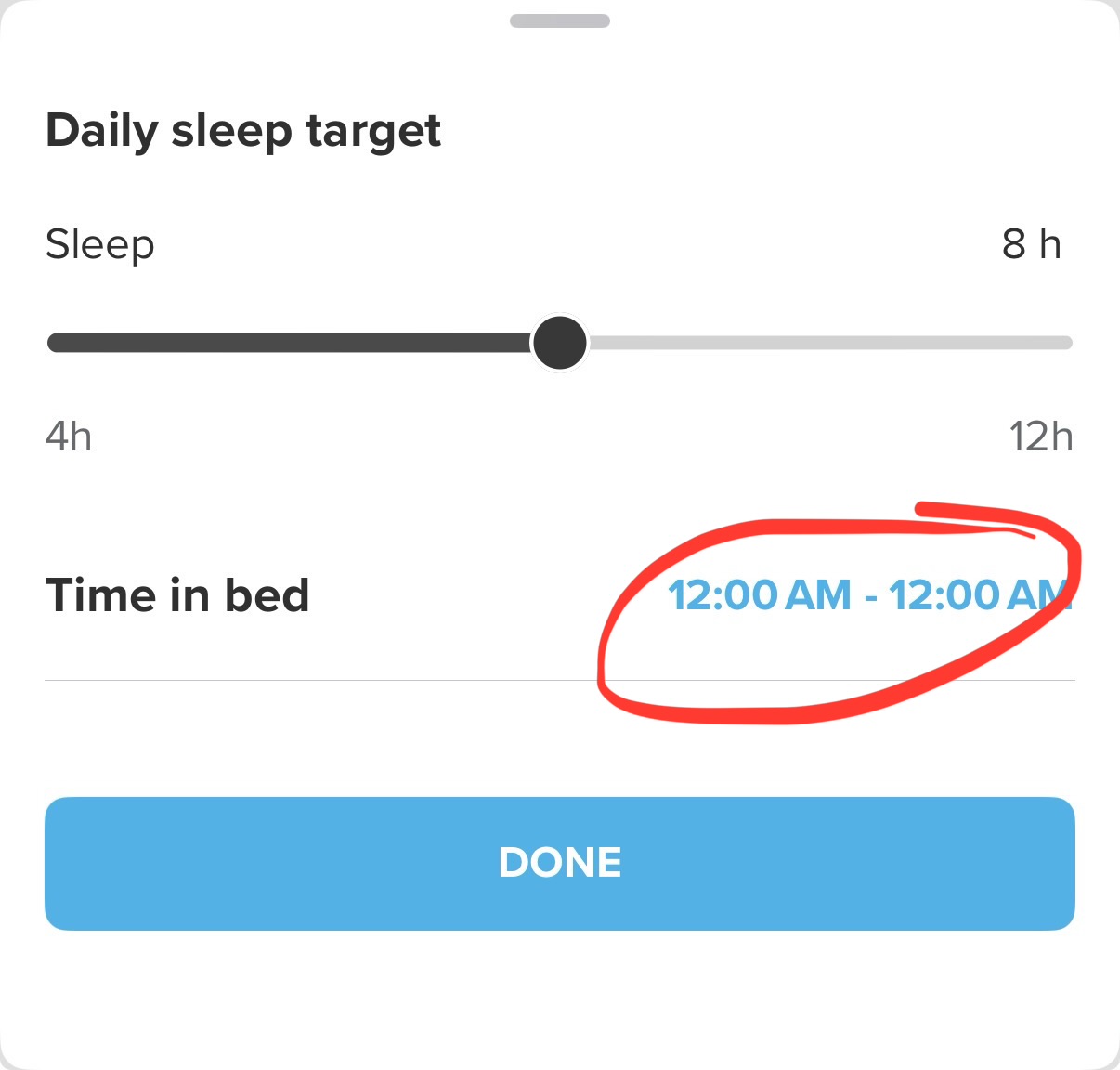
I would like to update/clarify the above instructions as per my (successful) fix.
Re: 2 - you do this in the (iOS) Suunto App. My time in bed was (re)set to be from 12:00AM - 12:00AM and that’s why the watch was showing a day old sleep data (see img. below).
I also had to add point 4. - soft-reset of the watch (12 seconds upper button).
All good now in the land of sleep.
-
@Freezer Hm, I have the same problem, and I don’t have
Time in bedoption…UPD: Oh, I got it. At first, I should forget the device and restart the app, and then this option appears… wow…
Thank you!
-
@Egika , @Freezer Thanks for these clarifications, indeed I assumed the sleep time adjustments had to be performed on the watch, not the iOS app. And after „forgetting“ the watch AND restarting the app on the iPhone, the „time in bed“ settings showed up. Given that apparently past data is not changed, I will have to wait for after the coming night to evaluate the effect this has (or has not) taken. By the way, if you have a second iOS device running the Suunto app, but obviously not paired with the watch, the settings (which then seem to be linked to your generic account and not to a specific watch) can also be changed there without undergoing the forgetting/re-pairing procedure. The „time in bed“ settings are visible on my second iPhone.
-
yes, this is an iOS only issue. Thus not only originating in the watch.
-
@itoakio & @mountainsdudeshikes, as step 4 of the procedure, try force restarting (soft reset - 12sec upper button) the watch. My Vertical shows correct sleep info/HRV in the widgets after the restart.
-
@Freezer worked! thank you very much. my recovery metrics are still off between app and watch. It should even out over the coming night I think.
-
@Freezer indeed, it does. thank you. Let‘s hope this is a permanent fix.
-
I have had this same issue for a week or so. Tried the advice given here, but still not working. I don’t even see the time in bed -option. I also uninstalled the app. Now it seems to upload duplicates of my recent activities
 Hopefully this sleep thing gets sorted quickly as now the information in the watch is quite useless.
 -
@OpaJaa, in the Suunto App you select “Sleep” - either from the Dashboard or the Training Zone/Recovery/Sleep so that you get the expanded sleep view and scroll all the way down to the bottom and select “Daily sleep target” - that’s where time in bed it’s supposed to be set (once set it’s no longer available). NB you should also re-pair and force restart the watch after this.
-
@Freezer thanks, but it is not there. I did the un-pairing, couple force restarts and even reinstalled the app. And still I only see the amount of sleep slider there. And yesterdays sleep in the watch. So it seems the workaround is not working for me. Waiting to get an updated version of the app or other guidance on how to proceed. I can live with this but it does give bit of doubt on the reliability of the software.
-
@Freezer And actually the sleep times are not available on the watch either. I think I originally set them from there. But now the sleep settings are missing it. Sleep tracking toggle is there but not the times when sleep should be tracked. I looked from the manual and it should be there.
-
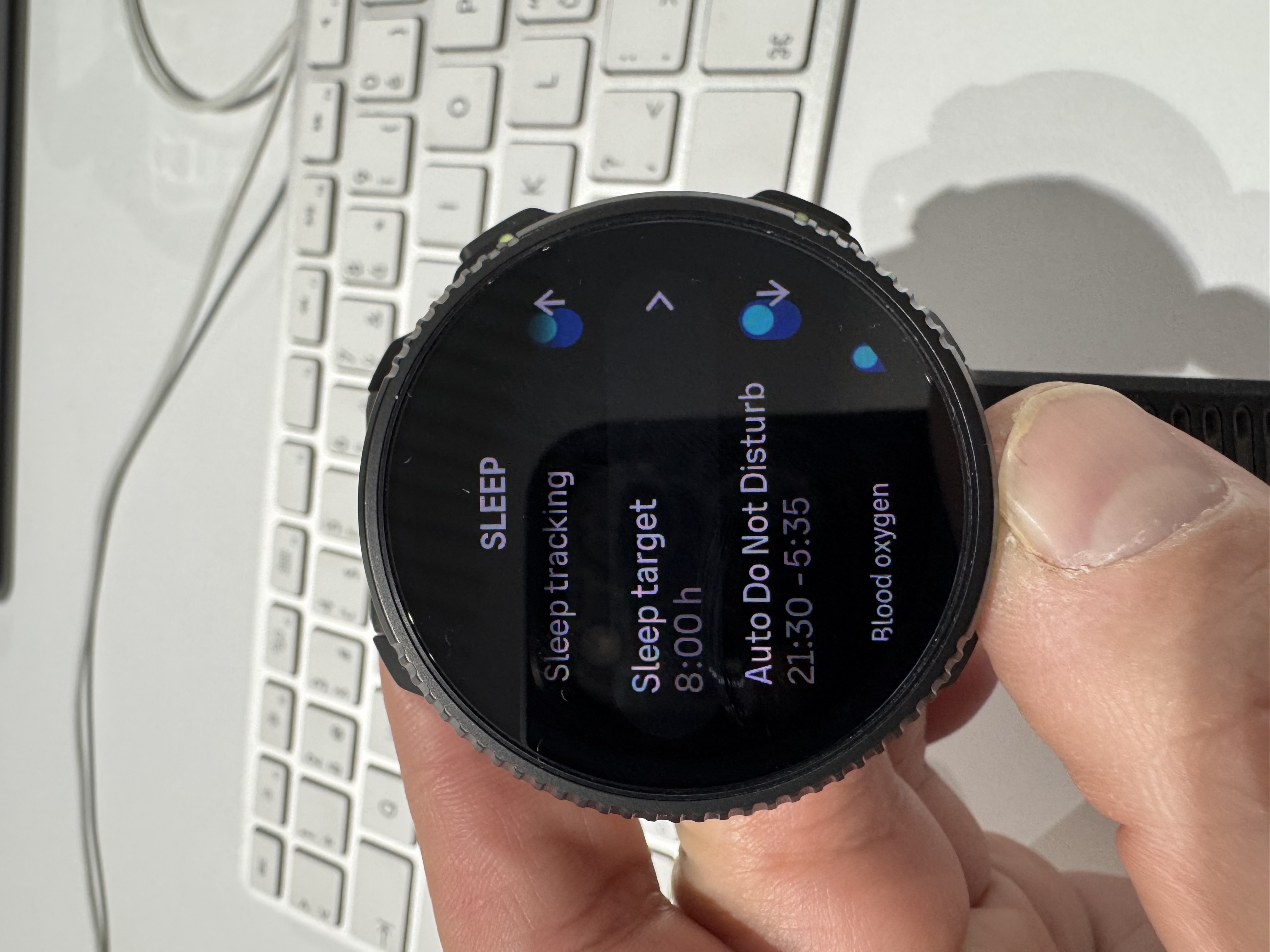
I have the same affliction. The software version in the watch is 2.50.26. The sleep widget shows it is offset by one day. It shows the last date a day earlier. Everything is fine in the app on both iOS and macOS. I wanted to try the instructions from @Egika , but for me the “Time to bed” setting is currently missing. I only have Sleep tracking, Sleep target, Auto DNB…
I tried unpair, pair, delete. Nothing works. I will wait for a fix

-
@Petr-Manek you should look for the “Time to bed” setting in the Suunto App (iOS), not on the watch.
-
@OpaJaa, sorry to hear that it didn’t work for you. I don’t have any other suggestions, for me it worked as described in the posts above.



Hello! It looks like you're interested in this conversation, but you don't have an account yet.
Getting fed up of having to scroll through the same posts each visit? When you register for an account, you'll always come back to exactly where you were before, and choose to be notified of new replies (either via email, or push notification). You'll also be able to save bookmarks and upvote posts to show your appreciation to other community members.
With your input, this post could be even better 💗
Register Login