GPX importing to Ambit3 Vertical not syncing
-
This watch is quite the struggle.
-I’ve imported a GPX file into the Suunto App, toggle “Use in watch” to on, and Saved. ISee the saved route. Great.
-attached watch to computer via Suuntolink; everything syncs. Great. (no idea if routes transferred)
-on watch go “Navigation”–>“Routes”–>“No Routes”.What am I doing wrong here? Is there a lag between the app -->cloud–>my PC?
-
@chrismcquinn , in you other thread you had this:
/…/ I’ll also say I can sync the watch with my PC via Suuntolink, but those routes are not sent to the cloud, or the app isn’t reading the cloud /…/
Most likely you are using 2 different accounts, just make sure the one you are using with Suunto App (User Profile > Settings > account settings )
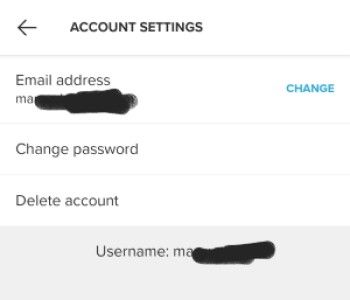
matches the one in Suuntolink ( burger menu at upper-right > watches )

-
@margusl Wow! That was exactly the issue. How did you know?
Thank you so much for taking the time. For a second I was scared my watch had become a brick.
Thank you again!!!
-
M margusl referenced this topic on
Hello! It looks like you're interested in this conversation, but you don't have an account yet.
Getting fed up of having to scroll through the same posts each visit? When you register for an account, you'll always come back to exactly where you were before, and choose to be notified of new replies (either via email, or push notification). You'll also be able to save bookmarks and upvote posts to show your appreciation to other community members.
With your input, this post could be even better 💗
Register Login