Several navigation issues (feedback)
-
@Joaquin sure.
This is the usual route for these testings (re-uploaded with better quality)
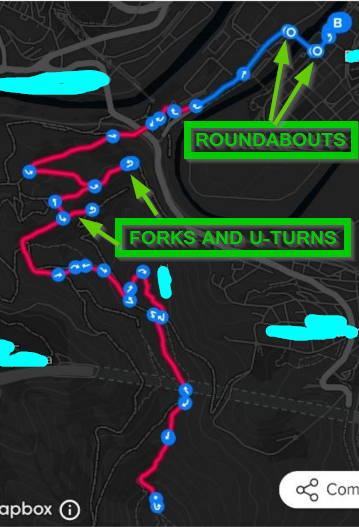
The track is roundtrip: Up (with 2 additional forks) to the top of a mountain, and down repeating everything again
Notifications mostly work in both directions. It’s just about the accuracy of them, remaining the notifications inside and after the turns (refer to my previous post with the shots of the very first roundabout)
About the microphone/speaker, I was only speaking about the audio navigation notifications since this thread is about navigation thinking in the use of the headphones (I.E, the Garmin Instinct 3 does not have a microphone or speaker but has audio notifications through the headphones (and that watch is able to even notify the roundabouts and despite It can’t show the maps). Suunto has already invested in the engineering of very nice headphones and with very interesting products that are already in the market (like the Spark). I think that with several software updates (both watch and headphones), those kind of products could be used as a very nice marketing thing (for something like an “ecosystem”). I’m thinking also in running indoor or treadmill when there’s no GNSS signal.
But this is another topic, just to explain It further (and also to say that you already have the microphone and speaker in the market that could be used to go further). In my opinion, optional audio navigation notifications are sometimes incredible useful.Thank you so much
-
@joaquin there’s definetely a bug here, and I found the explanation.
I made another experiment. If inside Komoot I don’t check the roundtrip, it does not make any effect , since the route is roundtrip (or at least, I can see indications in both directions despite of that)
But it is more. It’s Komoot what is making the bad turn-by-turn directions. Have a look at this photo:
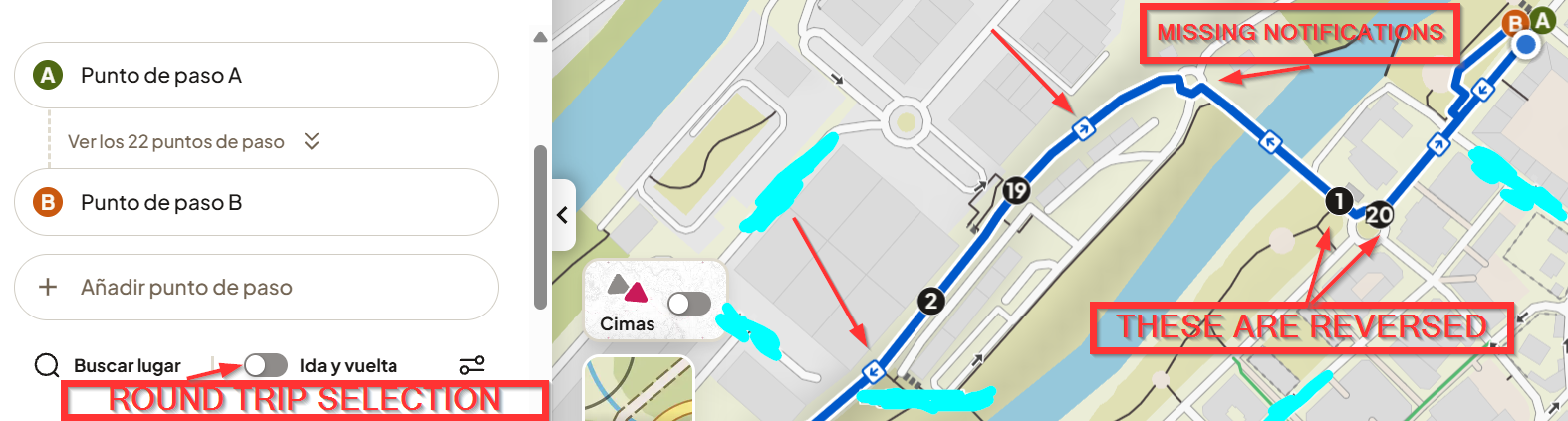
A: Start point
B: End point of the routeWhat you see in the photos I posted in the other post is that Suunto is notifiying that 1 as the very first point, because of Komoot’s issue. That’s why there’s the 18 meters offset in the photos I posted for you.
So offset explained.
Now, about the photos you uploaded.
Photos 2,4,3,5. Suunto’s notifications seem to be wrong and that is a one-way track (no roundtrip).What I’m seeing (3 and 5) is that there are several turns close together. It’s like there is something bad at the algorythms, detecting 2 very close left turns as an U-turn. Perhaps this is Komoot related.
What happens when turns are very close inside Komoot?In my opinion, it’s very clear Komoot’s workaround is more a problem, once we know others are not having these kind of issues.
-
Today, I repeated the whole track.
A shot inside a turn: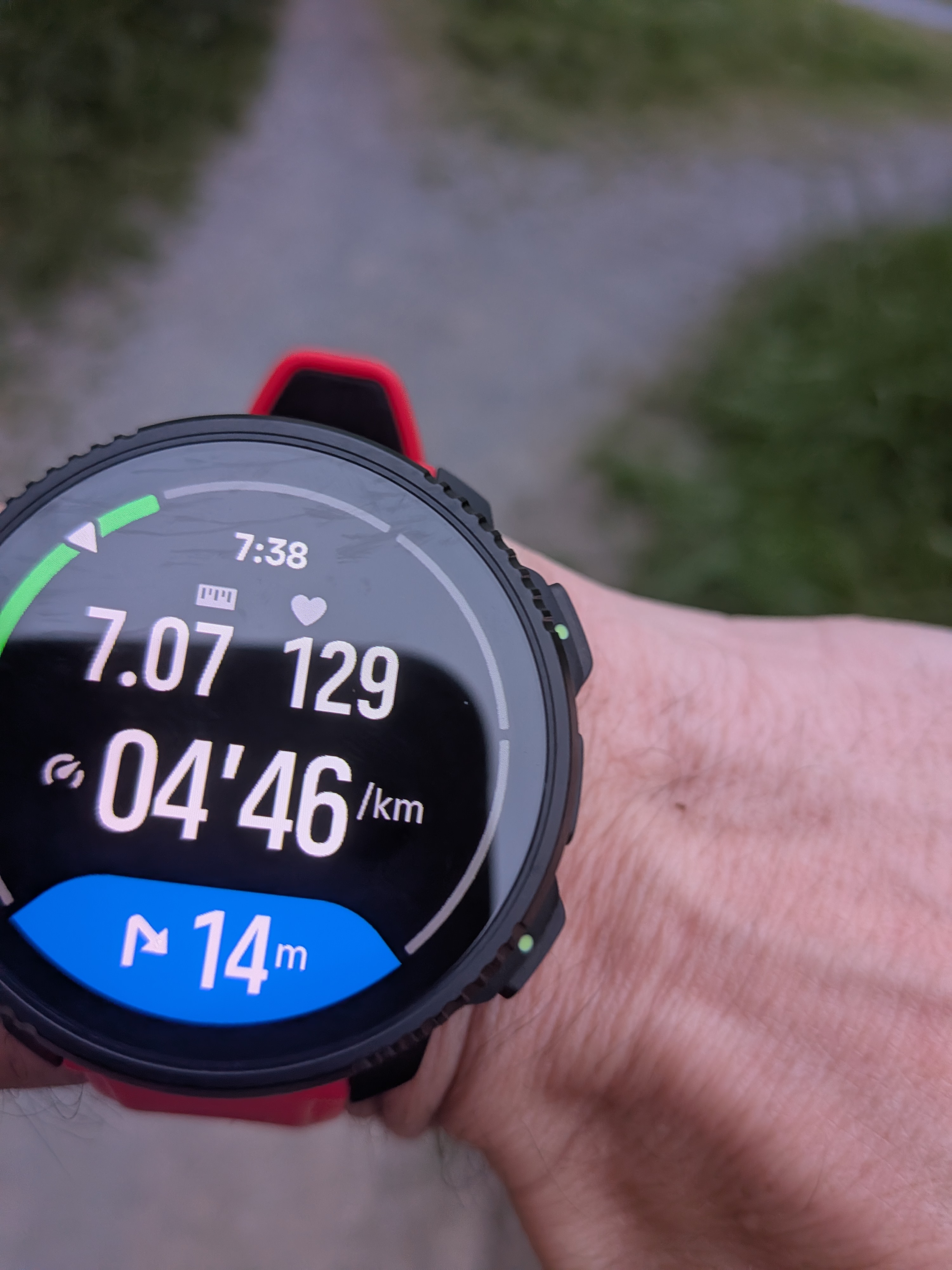
Another one:
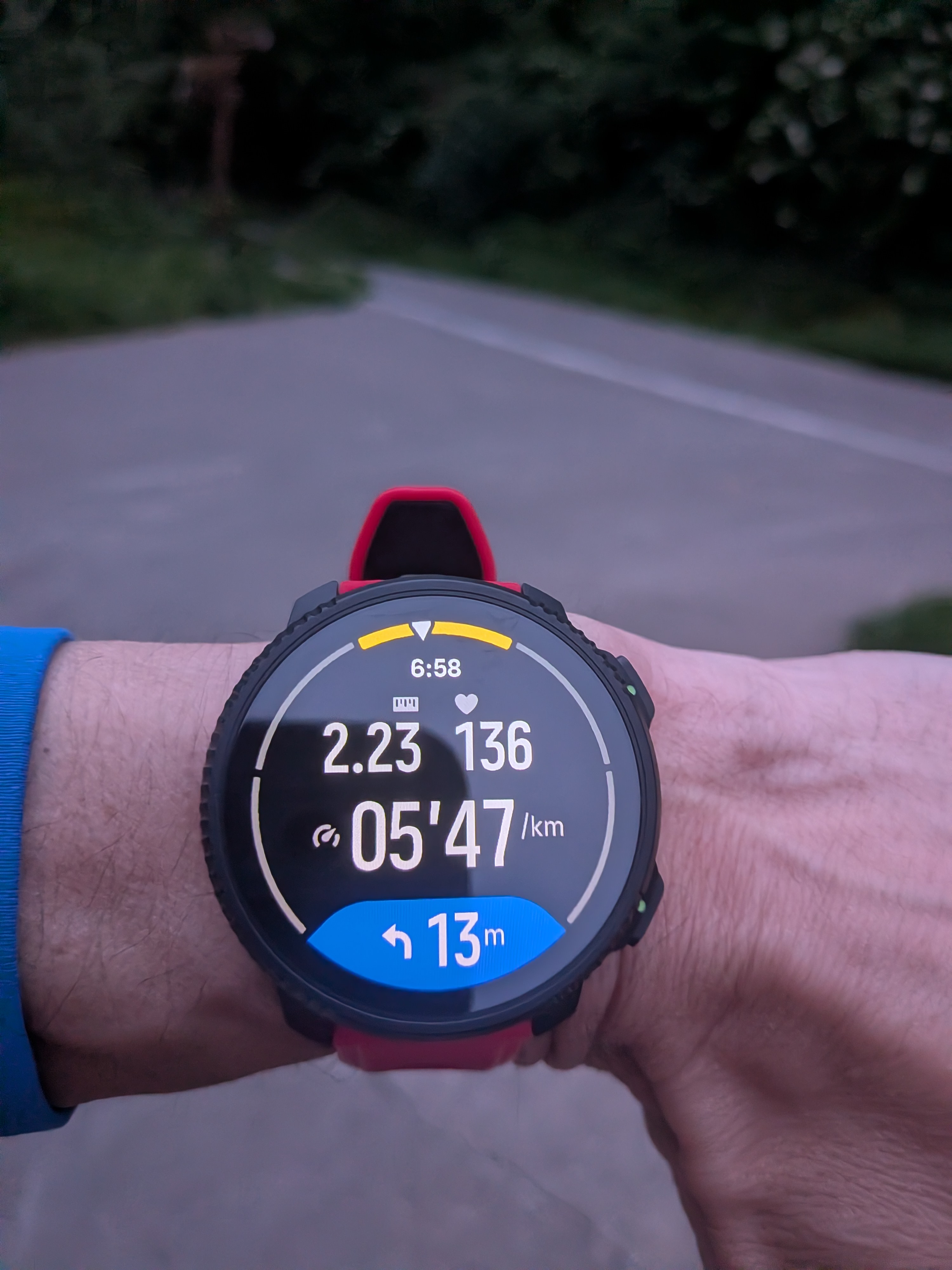
The offset issue is there all time. Worst thing seems this is caused by Komoot, not Suunto. And basically Komoot’s algorythms are not as strong as other’s (which is bad for Suunto).
And, I also got:
- 2 false out of the route. One was at the top of the last hill/mountain. Notifying a 30m offset.
- False incoming climbs notifying a down when I was going up and also an up notification when I was going down. The first one was near the end of the last climb.
As explained before, I have the feeling that autoreverse needs some serious work too because of the lost turns.
Suunto Vertical 2 Titanium Sage, Suunto Run
-
Just a note:
If I create a route in the Suunto app or the Suunto Route Planner, the turns are announced correctly, about 20 meters before the turn. If I create a route in Mapy .com, the turns are announced with a delay, usually exactly at the point of the turn. I dont have Komoot.Suunto: Ambit 3, Spartan, Vertical 2
Garmin: FR 405, 935, 970 , Fenix 3, 6X, Epix2 Pro -
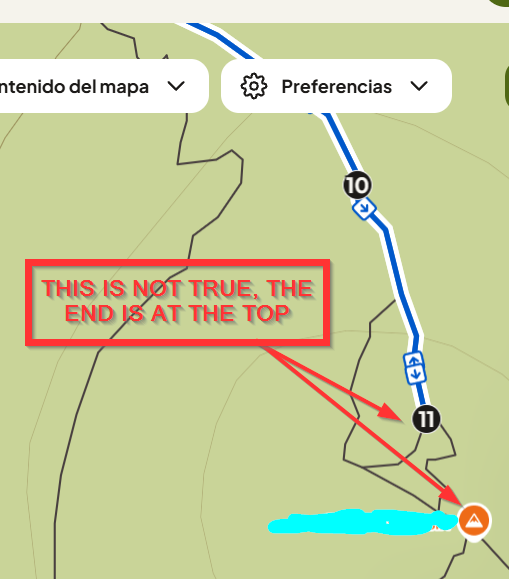
Explanation of one of the “Out of the route” . It seems an issue generated by Komoot:
Track inside Komoot:
Track inside Garmin Connect:
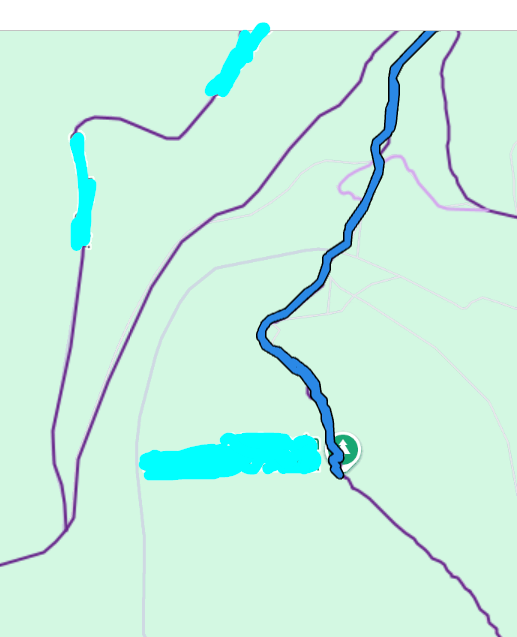
I have never finished that route where Komoot is saying, I allways finish at the top (as you can see in Garmin Connect’s track).
- It does also explain the last bad climb guidance notification. The watch triggered a downhill pop-up, but I was going up (the track was not finished yet).
- It means the Komoot workaround does not only affect to the turn-by-turn notifications, but ALSO to Climb Guidance.
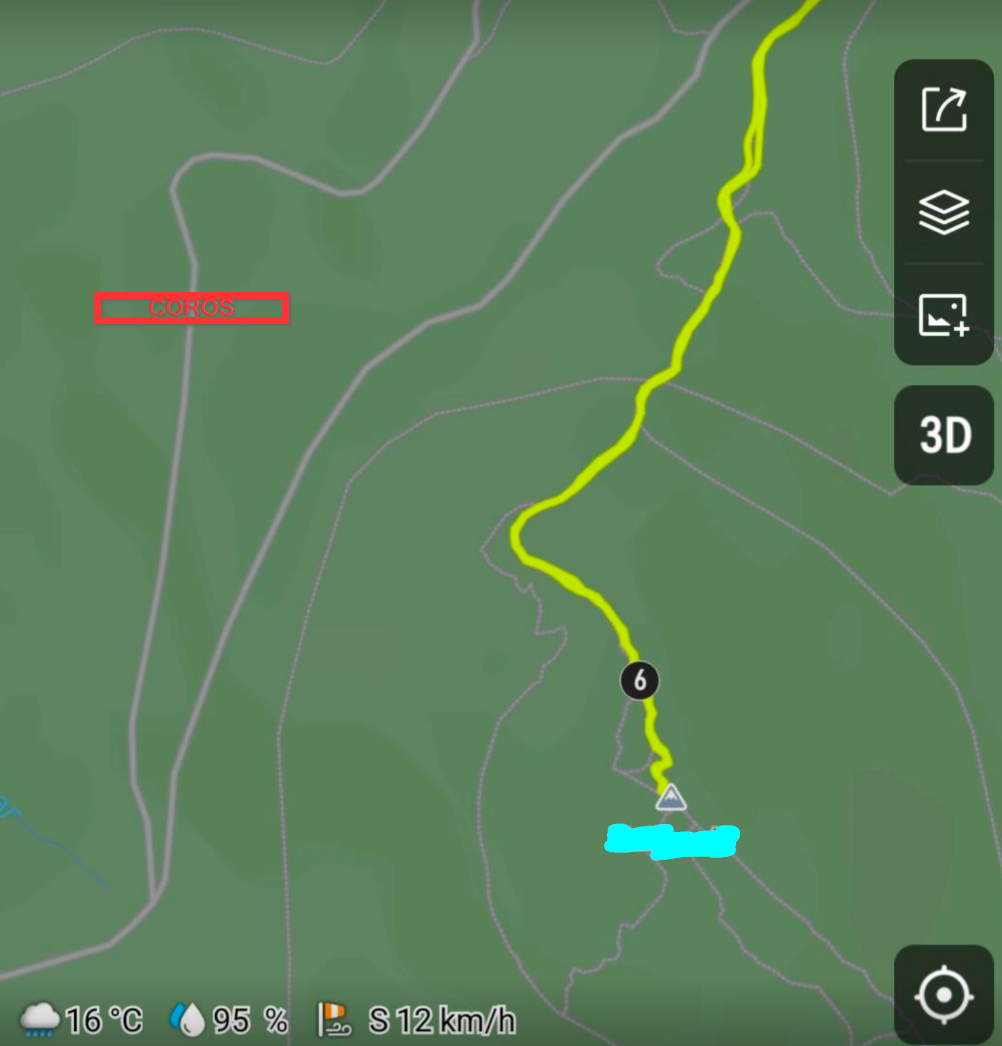
Needless to say that, despite I had tested this track in Coros and Amazfit, I have re-uploaded the same track to Coros and Amazfit to be sure. This issue is only in Kommot.
Coros:
Amazfit:
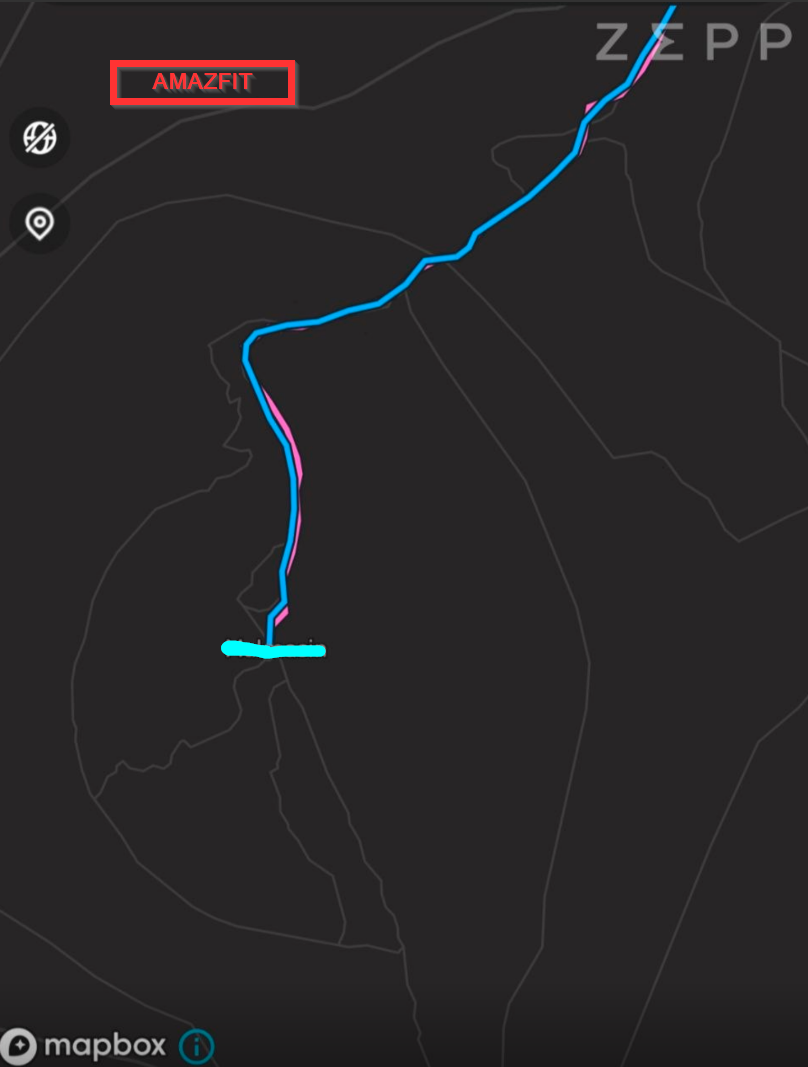
Another thing:
- The shot with the track I uploaded yesterday here:
https://forum.suunto.com/topic/15071/several-navigation-issues-feedback/39
In the first fork (of those 2), I noticed I have reversed Climb Guidance notifications (uphill when it should be downhill and downhill when it should be uphill). Those 2 small forks, are basically 2 slopes with a final U-turn. I understand it is very likely this issue is (again) caused by Komoot, since it’s Komoot who is creating all the logic that Suunto uses for the turn-by-turn directions and Climb Guidance.
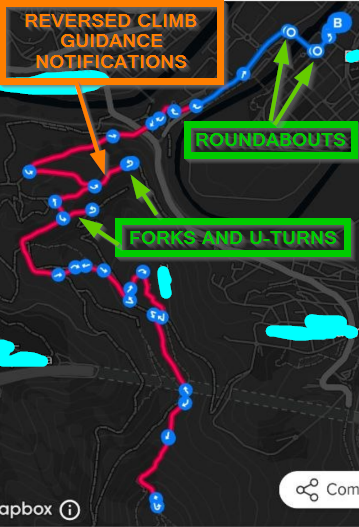
What I don’t understand how is it possible I’m finding these kind of issues.
If Komoot is not accurate, will Suunto have the Komoot approach forever?
-
@runyx17 said in Several navigation issues (feedback):
Just a note:
If I create a route in the Suunto app or the Suunto Route Planner, the turns are announced correctly, about 20 meters before the turn. If I create a route in Mapy .com, the turns are announced with a delay, usually exactly at the point of the turn. I dont have Komoot.Guys. This is important. So Mapy seems to have the same issue as Komoot.
And, one VERY interesting thing:
If I upload my track in Suunto Route Planner, the end is also ok. Look:
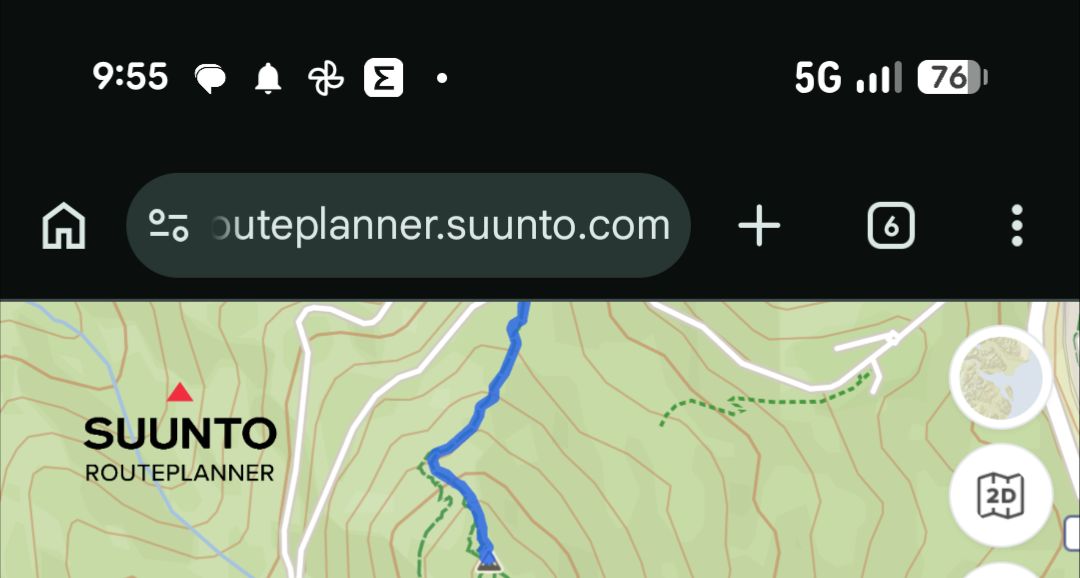
But in Suunto Route Planner, can I upload a GPX (provided by a race organization) and have turn-by-turn directions?
Because it seems we can have a fix here for several issues related to TBT and even Climb Guidance. And it’s also very likely that autoreverse can be (just a bit) more reactive once the offset is solved.
-
Route Planner does not have the turn-by-turn.
I tried saving that route in Route Planner and then uploaded into Komoot, and the same issues persist in Komoot. -
-
I created a support case in Komoot with the GPX and a photo that shows the offset. I should not (this is not my job) but it’s also I can do with my track. I’ll keep this thread updated with their info (if there’s any). I also sent comments in the Suunto App.
-
I made some manual fixes but I’m not sure that an edit of the passing points will make any effect. I also fixed the end at that mountain in Komoot but this is not good at all . I should not edit anything downloaded (in this case I know the track, but that will not happen in a track of a place I have never been).
So I’ll test this edited track. I understand I have (at least) fixed the end at the top of the mountain (and the out of the route and the bad climb guidance notifications will not be triggered in that point), but the rest is really a mistery. -
Perhaps Route Planner is the solution. If you can make the imported GPX tracks have turn-by-turn, that’d be really fantastic.
Suunto Vertical 2 Titanium Sage, Suunto Run
-
-
Today I did another test with a different round-trip track.
-
Editing those points of the track in Komoot does not seem to make any effect. The offset is always there.
-
After a while, I went out of the route like 1km and then I returned to the route again and started running back in the route. The autoreverse did not work until a very long time. I started receiving notifications but after skipping many indications.
Another little thing:
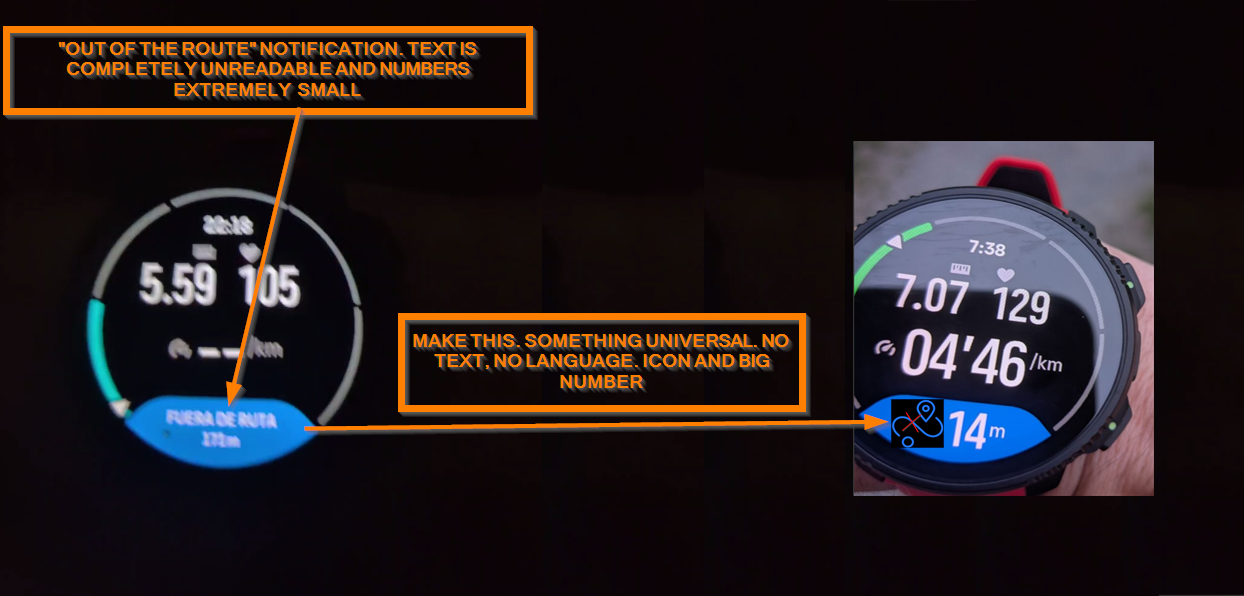
The text when out of the route is extremely small and completely unreadable.
This needs a little fix (that icon is just an invented one as an example, and colors and everything should be according to the layout)
-
-
D dreamer_ referenced this topic on
-
After 10 days, I have the answer provided by Komoot
Hello there,

Thanks for your message.

What you’re seeing is related to how komoot processes imported GPX files, and I’m happy to explain what’s happening and what you can try.

When you import a GPX file as a planned route, komoot doesn’t display the track exactly as it is. Instead, it processes it through its routing system. During this step, you’re usually given two options:

Stick to original route: keeps the track as it is, though some sections may appear as straight (off-grid) lines if they don’t match known paths. Navigation can be less precise in those parts. Match route to known ways: adjusts the route to follow mapped paths, which can slightly change the original track but often improves navigation guidance.

For round trips where the route overlaps itself (for example, going out and back along the same path), this processing can sometimes lead to unexpected results. You might see gaps, shifted endpoints, or the route not finishing exactly where it should. This can also lead to “off route” notifications on your watch.

Regarding turn-by-turn instructions, komoot provides guidance slightly before the actual turn to allow time to react. On connected devices like Suunto watches, this can feel more noticeable due to how the data is transferred, so a small offset is expected. Larger differences are often linked to how the route was interpreted during import.

Here are a few things you can try:
Re-import the GPX file on the komoot website and choose Stick to original route, then review the route carefully before saving
If the route is quite long and you’re using Premium, try importing it as a multi-day Tour with the same option
After saving, open the route in the planner and check that the endpoint and path look correct before syncing it to your device

If the route still doesn’t appear correctly after this, it falls into a known area where GPX imports can behave differently than expected. At the moment, there isn’t a way to fully prevent komoot from processing the file through its routing system.

If you have any other questions or need assistance in the future, don’t hesitate to reach out. We’re here to help!

Have a great day!
komoot Support Team
They basically confirm:
- GAPs and missing parts which can lead to “out of the route” notifications (and wrong Climb Guidance ones).
- Delays with turn-by-turn indications
So those both navigation issues Suunto watches have, are basically caused by Komoot, as I was pretty sure. I’ll continue with the support explaining other things like several turns in quick succession (and considering the delays), but this is a dead end.
-
I can’t try until Sunday but I wanted to share if anybody wants to try, since I have an interesting answer from Komoot’s
Thanks for sending the GPX file.

I took a look and found a workaround that should help you save the full route:
Click New > Import a GPS Route
Drag and drop the GPX file
Instead of selecting Import to Plan a Route, select Import as Activity
Tap Import Activity


This saves the file as a completed Activity on your account. On the map, the route should connect all the way to the end.

After that:
Click the three-dot icon on the right
Select Make a Copy
Click Save


The copied route will be on the Saved Routes. It should then show the full route from the completed Activity, rather than being cut short like it was when imported directly as a planned route.

You may, of course, delete the Completed Activity after.

Let us know how it works for you.

All the best,
komoot Support Team
So this solves the pre/post processing issues (perhaps) for the GAPs, and perhaps the offset thing. I’d like to test it now, but I’m out this weekend, lol.
-
-
said in Several navigation issues (feedback):
I can’t try until Sunday but I wanted to share if anybody wants to try, since I have an interesting answer from Komoot’s
Thanks for sending the GPX file.

I took a look and found a workaround that should help you save the full route:
Click New > Import a GPS Route
Drag and drop the GPX file
Instead of selecting Import to Plan a Route, select Import as Activity
Tap Import Activity


This saves the file as a completed Activity on your account. On the map, the route should connect all the way to the end.

After that:
Click the three-dot icon on the right
Select Make a Copy
Click Save


The copied route will be on the Saved Routes. It should then show the full route from the completed Activity, rather than being cut short like it was when imported directly as a planned route.

You may, of course, delete the Completed Activity after.

Let us know how it works for you.

All the best,
komoot Support Team
So this solves the pre/post processing issues (perhaps) for the GAPs, and perhaps the offset thing. I’d like to test it now, but I’m out this weekend, lol.
I tried this. I noticied an slightly improvement and the track is 20 meters more using this workaround. But the offset and the false “out of the route” issues persist. In fact, I’m getting wrong Climb notifications in this round-trip scenario (things like downhill notifications when you are going up and uphill notifications when you are going down). Autoreverse does also need a serious work.
-
Latest Komoot answer.
Thanks again for taking the time to test the workaround and share such detailed feedback throughout this investigation.

It’s helpful to know that importing the GPX as an Activity first and then copying it to Saved Routes improved the route ending behavior, even though the small offset and the turn-by-turn and climb notification issues are still present on your Suunto Vertical 2.

After reviewing all the information you provided, including the original GPX behavior across different platforms, it’s clear that komoot is interpreting this specific route differently during processing. Your detailed comparisons have been especially valuable in narrowing this down.

At the moment, komoot still needs to process imported GPX tracks through its routing system, so there isn’t yet a setting that completely preserves the original track geometry in all edge cases.

We're constantly developing and working on improving komoot, and rest assured, we're actively listening to the community to incorporate your ideas into our work whenever possible. Since komoot is used for various sports and purposes, we receive a wide range of requests. We collect, categorize, and evaluate all input to understand what will help the most users.

I've shared your insights internally for review. You can stay up to date with the latest features and improvements on our What's New and Product Updates pages.

Please note that we release weekly updates for the komoot app and website. Ensure your app is updated to take advantage of these improvements.

Thanks again for your patience, persistence, and the high level of detail you shared during testing.

Have a lovely day,
That basically means, end of support using the words an user wants to hear. Komoot’s support admits the issues but just that. Nothing further. This seems a dead-end in any case.
-
-
-
said in Several navigation issues (feedback):
Latest Komoot answer.
Thanks again for taking the time to test the workaround and share such detailed feedback throughout this investigation.

It’s helpful to know that importing the GPX as an Activity first and then copying it to Saved Routes improved the route ending behavior, even though the small offset and the turn-by-turn and climb notification issues are still present on your Suunto Vertical 2.

After reviewing all the information you provided, including the original GPX behavior across different platforms, it’s clear that komoot is interpreting this specific route differently during processing. Your detailed comparisons have been especially valuable in narrowing this down.

At the moment, komoot still needs to process imported GPX tracks through its routing system, so there isn’t yet a setting that completely preserves the original track geometry in all edge cases.

We're constantly developing and working on improving komoot, and rest assured, we're actively listening to the community to incorporate your ideas into our work whenever possible. Since komoot is used for various sports and purposes, we receive a wide range of requests. We collect, categorize, and evaluate all input to understand what will help the most users.

I've shared your insights internally for review. You can stay up to date with the latest features and improvements on our What's New and Product Updates pages.

Please note that we release weekly updates for the komoot app and website. Ensure your app is updated to take advantage of these improvements.

Thanks again for your patience, persistence, and the high level of detail you shared during testing.

Have a lovely day,
That basically means, end of support using the words an user wants to hear. Komoot’s support admits the issues but just that. Nothing further. This seems a dead-end in any case.
Today I tried the TBT of that roundtrip route in my wife’s Suunto Run and it’s a good test to see the issue. The thing is that the Run only notifies the TBT with a vibration so you are not looking at the screen for the TBT.
It’s super clear the vibration is inside but mostly after the turns, which is very bad. -
@dreamer_ Run is a different platform compared to the other Suunto watches, even with its own dedicated R&D, so it’s normal to see noticeable differences in certain areas.
The focus of Run is to be Suunto’s entry-level offering, mainly targeted at road runners who occasionally practice other sports.
The goal behind Run is to provide an affordable watch for users who are not 100% outdoor-focused, allowing them to experience the Suunto ecosystem at a more accessible price point. If they enjoy the experience, they can later move up to the more “premium” lineup such as the Suunto Race S, Suunto Vertical 2, Race 2, and so on.
As an outdoor user myself, I completely understand your concerns and I even share some of them. However, I think we also need to carefully differentiate the entry-level Run range from the more advanced models. Let’s see what surprises a future Run 2 may bring.
Regarding the turns, this only happens to you with Komoot, right? With routes created directly in the Suunto app, everything works perfectly?
-
@Joaquin said in Several navigation issues (feedback):
@dreamer_ Run is a different platform compared to the other Suunto watches, even with its own dedicated R&D, so it’s normal to see noticeable differences in certain areas.
The focus of Run is to be Suunto’s entry-level offering, mainly targeted at road runners who occasionally practice other sports.
The goal behind Run is to provide an affordable watch for users who are not 100% outdoor-focused, allowing them to experience the Suunto ecosystem at a more accessible price point. If they enjoy the experience, they can later move up to the more “premium” lineup such as the Suunto Race S, Suunto Vertical 2, Race 2, and so on.
As an outdoor user myself, I completely understand your concerns and I even share some of them. However, I think we also need to carefully differentiate the entry-level Run range from the more advanced models. Let’s see what surprises a future Run 2 may bring.
Regarding the turns, this only happens to you with Komoot, right? With routes created directly in the Suunto app, everything works perfectly?
I tested the Run using the route created with Komoot’s algorythms. That’s the key of my post (no matter if I was using the Run or my Vertical 2 Titanium, since I used Komoot’s algorythms for creating the GPX with TBT indications).
About the issue, you are right. It seems created by Komoot and it happens in both my Vertical 2 and my wife’s Run. It’s very clear Joaquin. In fact, Komoot’s support confirmed the offset is created by them.
There are also several things I was talking , like missing the final part in that route because Komoot’s issue or wrong Climb notifications because Komoot does a pre/post-processing of the routes, affecting the performance of the navigation to several things.But if you want TBT in a route that is already created (I.E, a GPX track provided by a race organization) , at this moment. you need to use Komoot.
In my opinion, now you have a super nice tool like Route Planner, I’d be incredible nice if all the algorythms are made by Suunto instead of using Komoot’s.
-
@Joaquin I’d like to revisit the issue of creating a route in offline mode on iOS. I recently ran into this, and the app generated a route in a straight line without using trails. Is it normal for the route to be generated without using trails? What should I do in this situation—for example, should I create a route using waypoints (which will result in straight lines between the waypoints)?
Update: I accidentally opened the map settings and discovered that you can switch between online and offline modes. The route is calculated based on the selected mode. In offline mode, without a mobile network connection, the route is calculated using trails. -
@dreamer_ I recreated exactly the same route in both platforms after several years without using Komoot, because I manually create all my routes directly in the Suunto ecosystem and realistically no longer need Komoot.
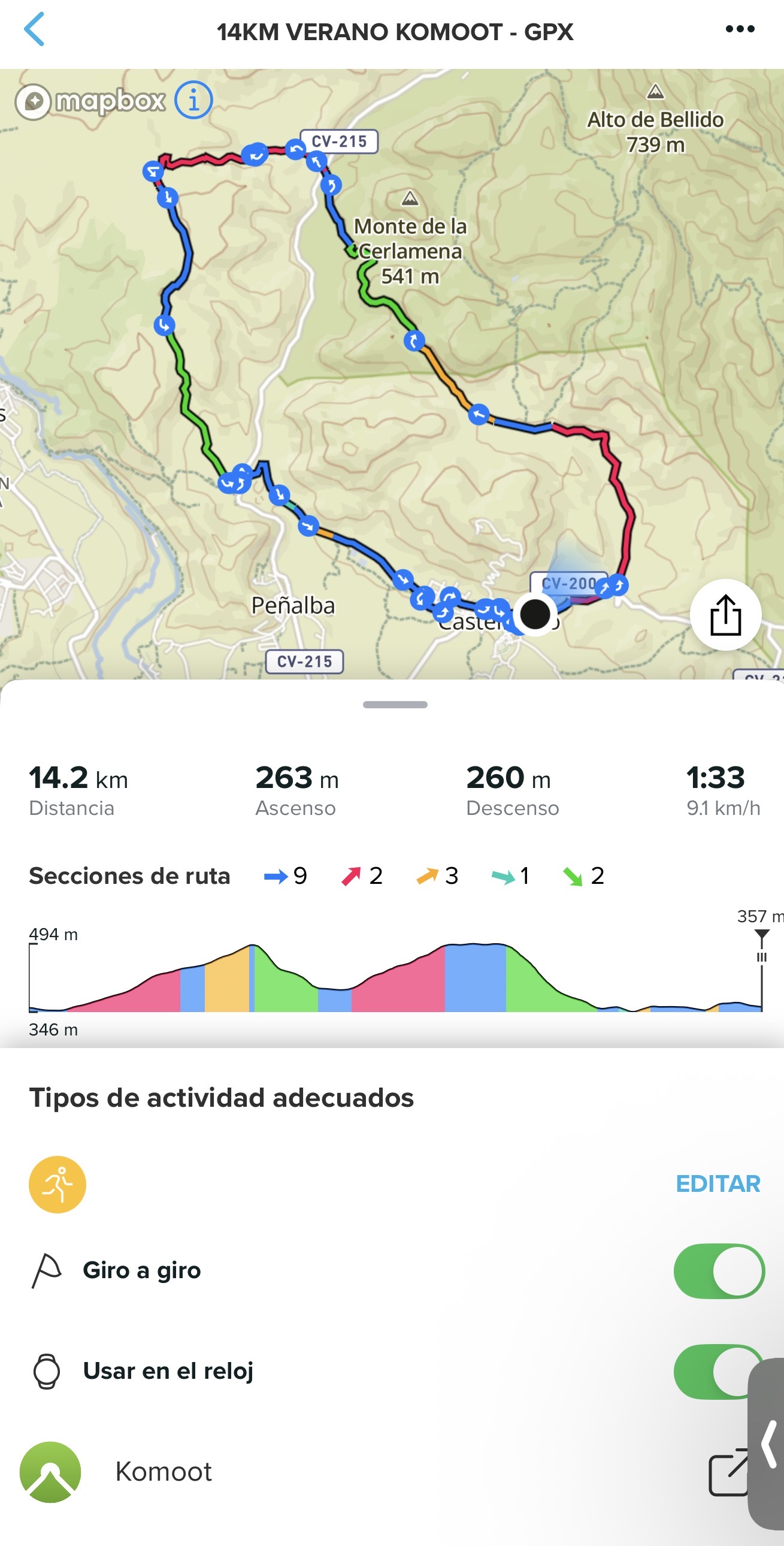 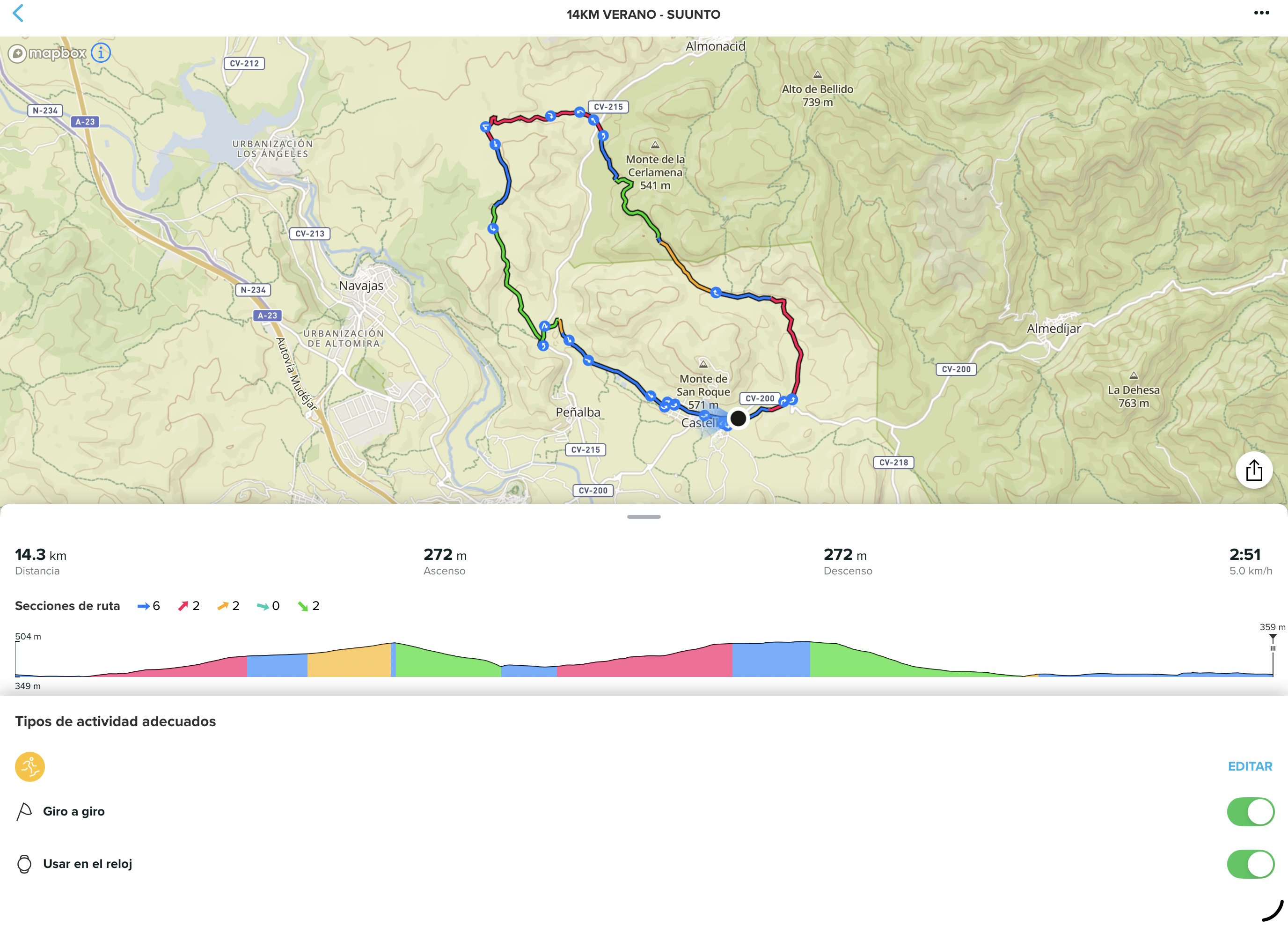
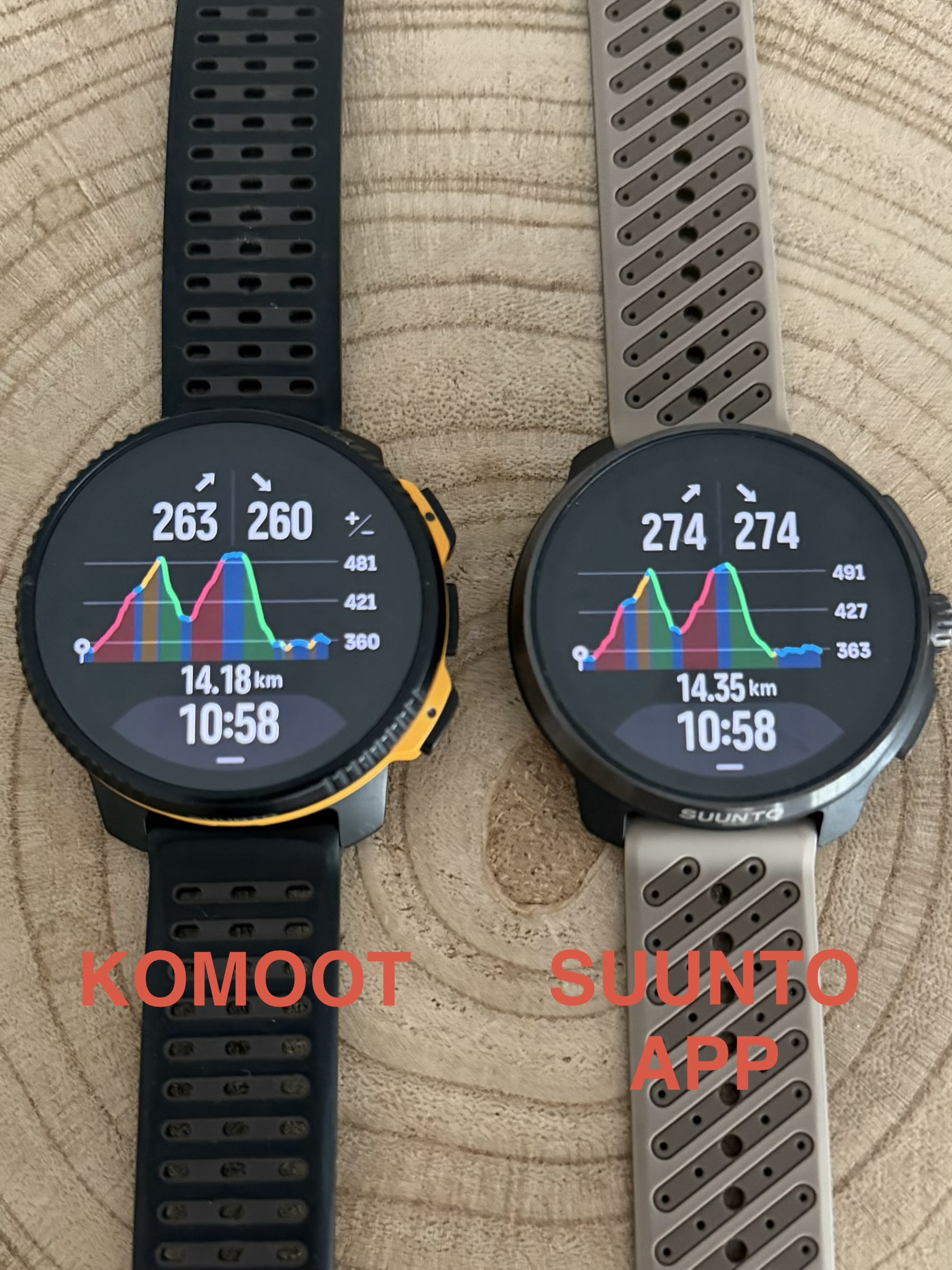
However, after testing both side by side, I found several serious issues that should be addressed, especially considering that Komoot’s core business is route creation and reliable turn-by-turn navigation for sports watches. In this case, Suunto cannot really do anything because the problem originates from Komoot’s route and elevation data itself.RACE 2: SUUNTO APP
VERTUCAL 2 : KOMOOT- Distance and elevation discrepancies
The route generated in Komoot shows a shorter total distance compared to the same route created in Suunto App, which appears significantly more realistic and accurate.
- Komoot: 14.2 km / 263 m ascent
- Suunto App: 14.3 km / 272 m ascent
This difference may seem small on a short route, but in ultra-distance activities these accumulated discrepancies could become a significant issue.
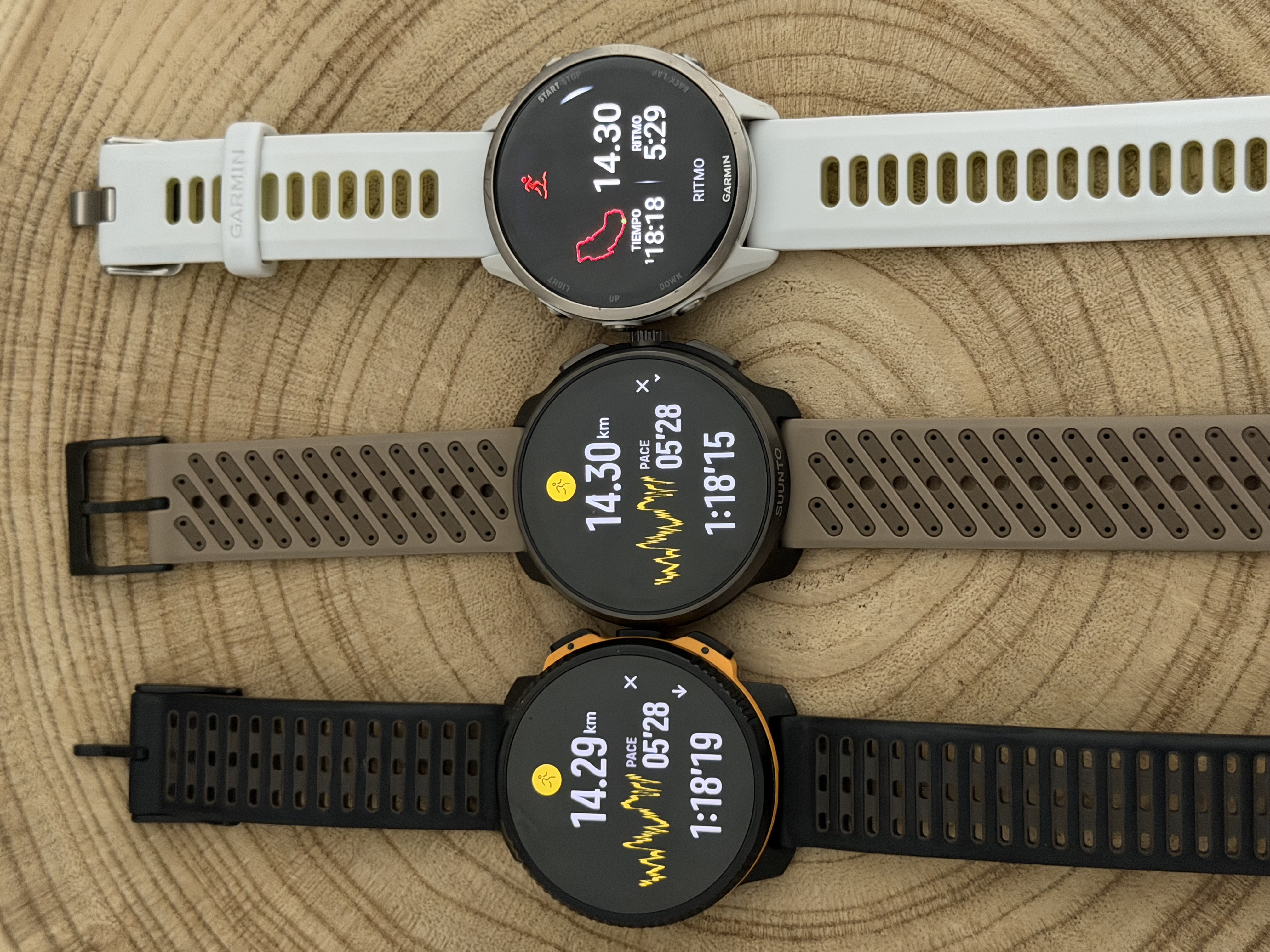
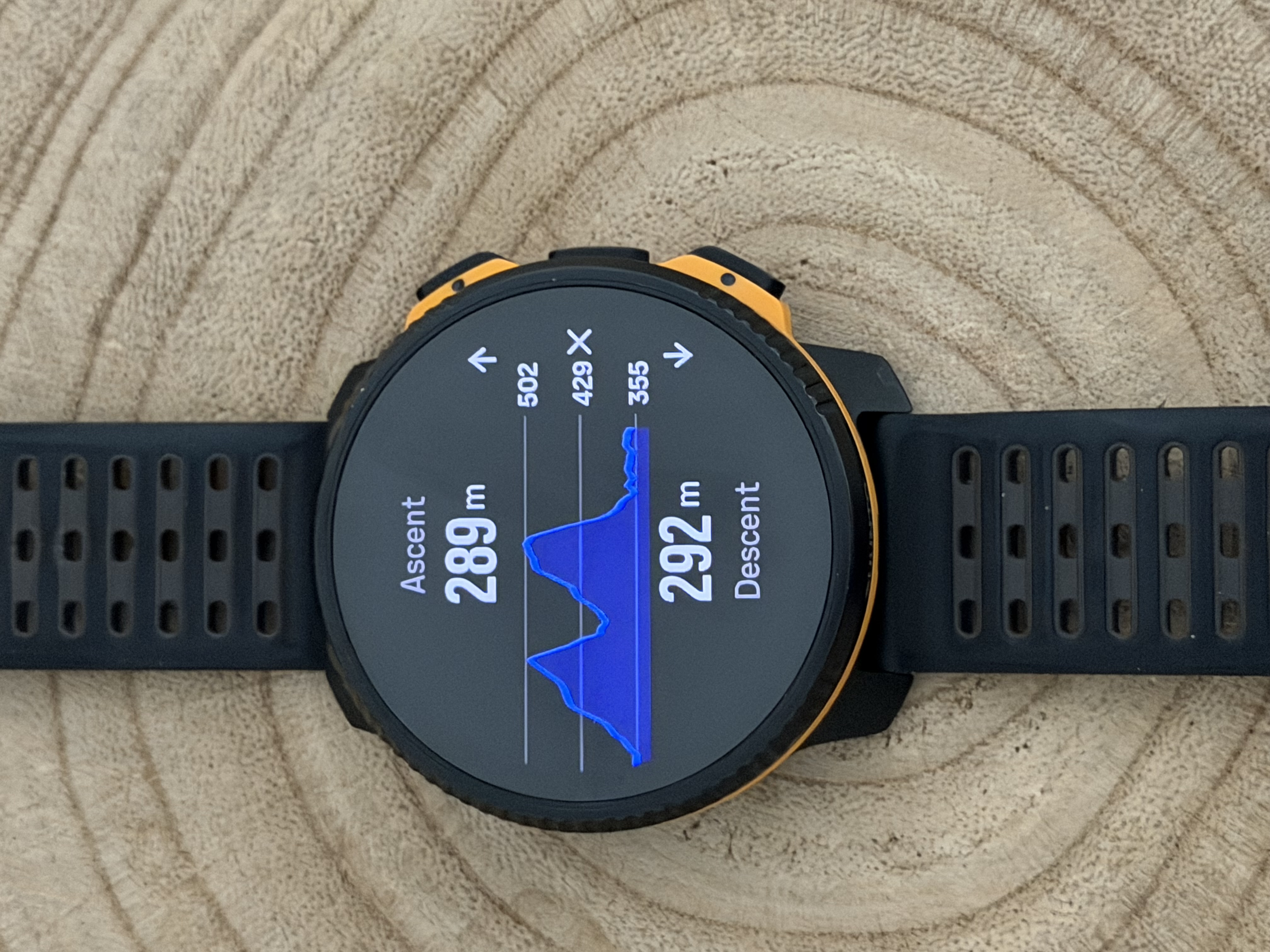
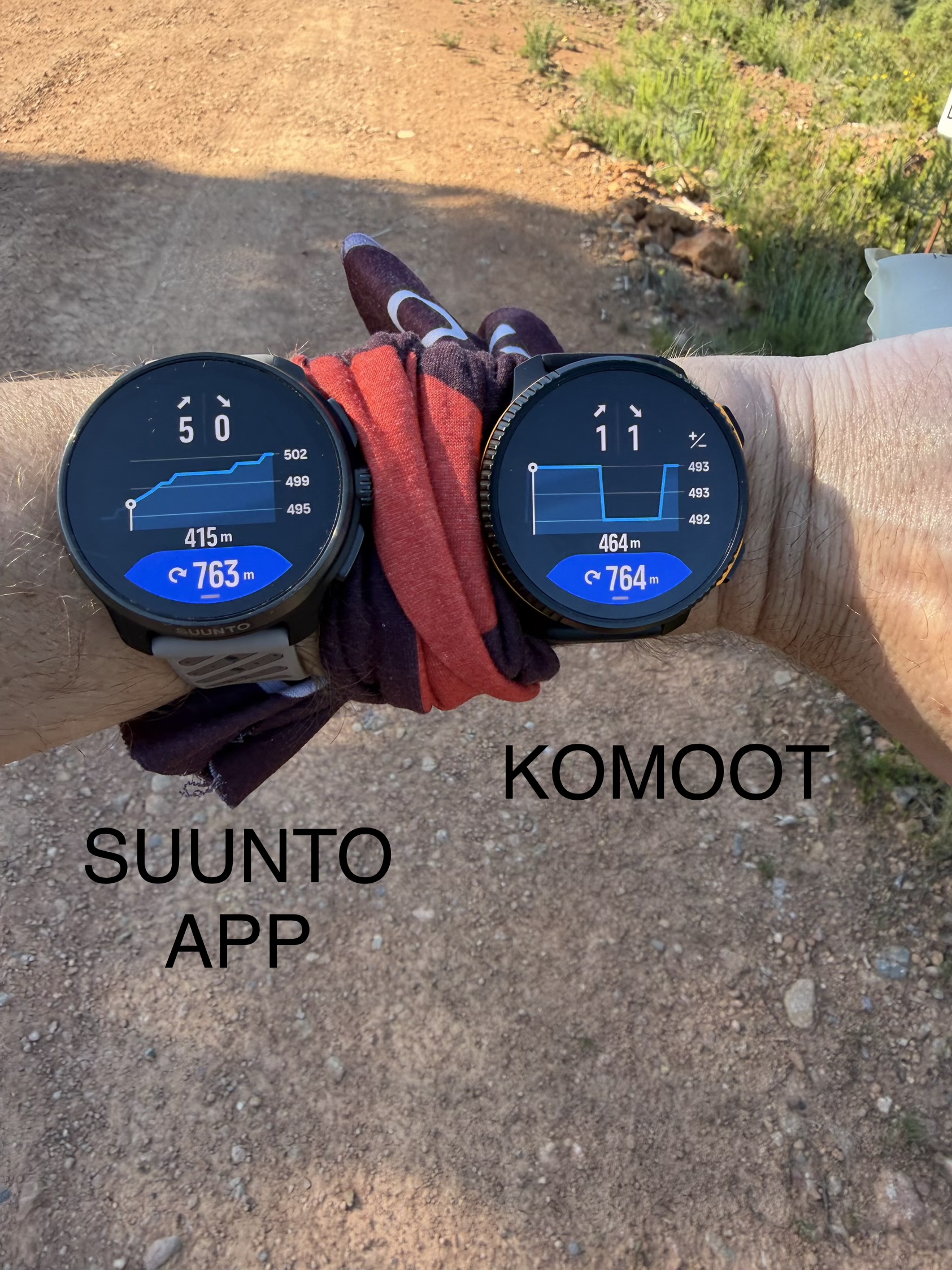
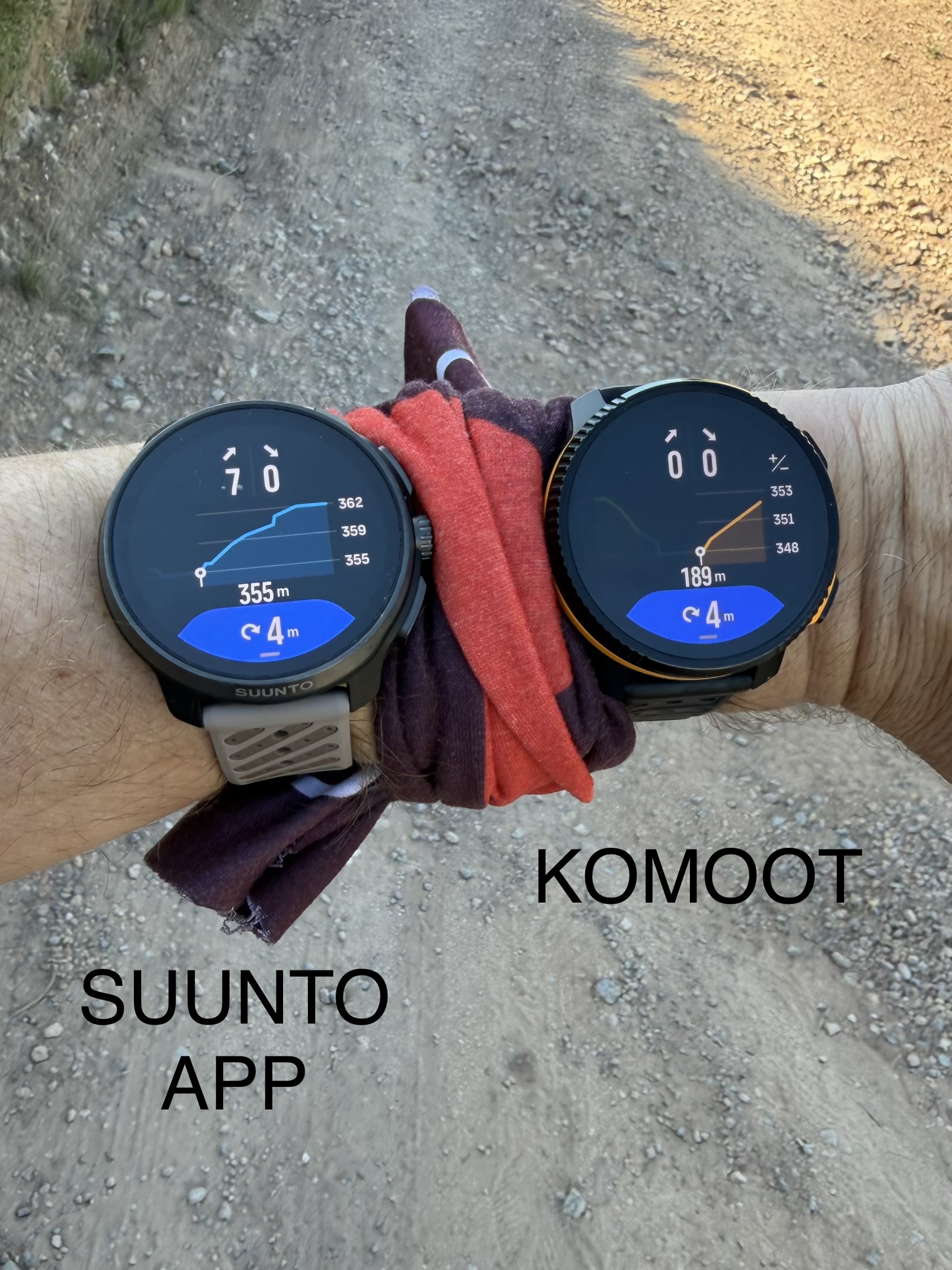
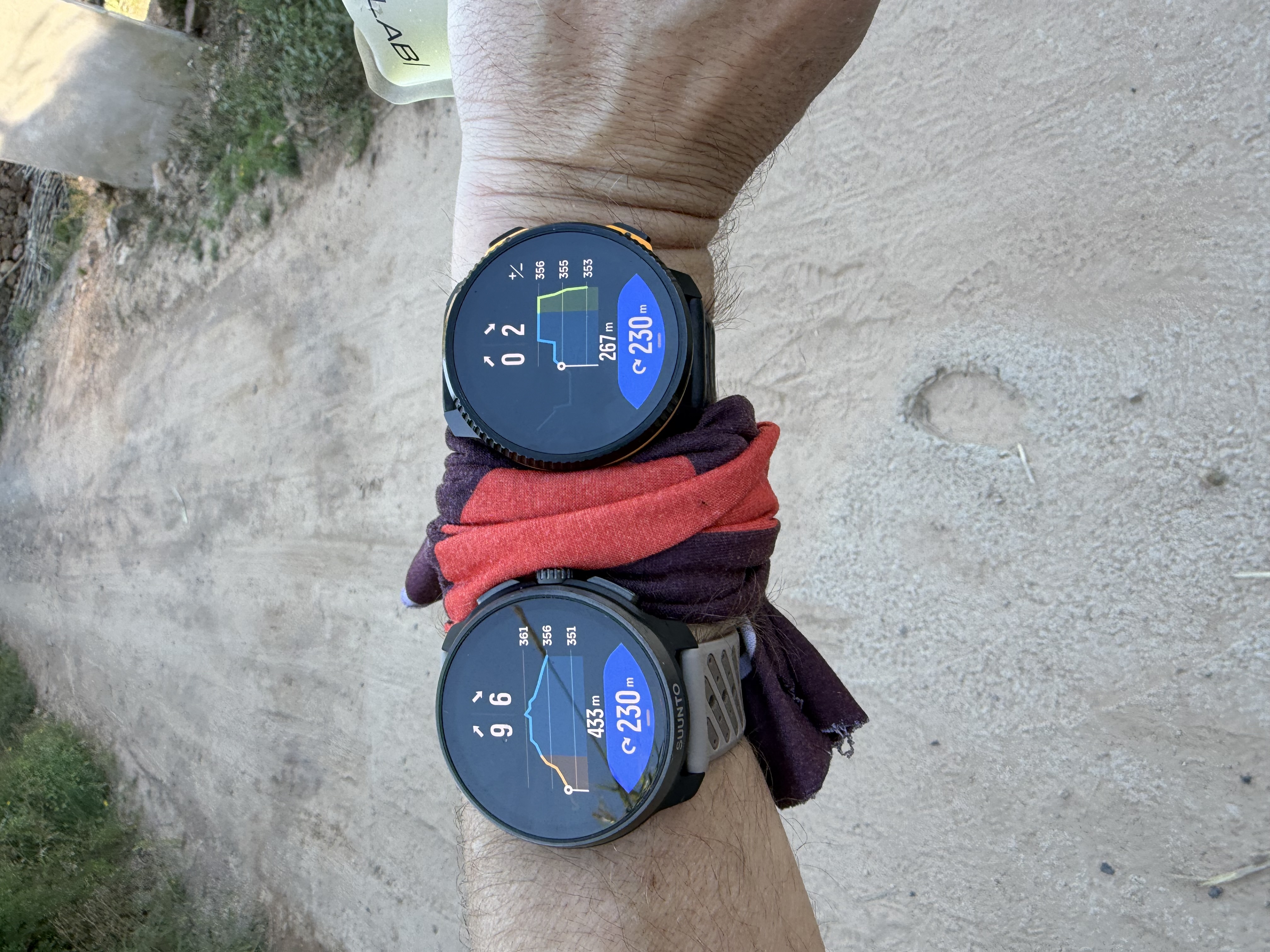
- DEM elevation data quality and Climb Guidance accuracy
The biggest problem is clearly related to the DEM (Digital Elevation Model) data used by Komoot.
The elevation profile generated by Komoot appears to use a much lower-resolution DEM source. This affects:
- Total ascent/descent calculations
- Elevation precision
- Turn-by-turn climb segmentation
- Climb Guidance accuracy on watches
At first glance, the overall elevation profile may look acceptable, but when analyzing the route in smaller sections (around 500 m), it becomes obvious that Komoot simplifies the terrain excessively and often represents elevation changes as straight lines.
Because of this:
- Flat sections are sometimes shown as climbs
- Climbs can appear smoother or shorter than they really are
- Small terrain variations completely disappear
- The resulting climb profile becomes much less detailed and less accurate
This creates the false impression that Suunto Climb Guidance is inaccurate, when in reality the issue comes from the DEM data and elevation processing provided by Komoot.
The attached photos clearly show these inconsistencies:
- Different ascent/descent totals between both platforms
- Simplified elevation graphs in Komoot
- More realistic and detailed terrain representation in Suunto App
- Incorrect micro-profile interpretation during navigation
For a platform whose primary purpose is route planning and navigation for outdoor sports, this level of DEM simplification is a major weakness that directly impacts the user experience on connected watches.
Technical & Product Specialist – Suunto Iberia
-
@dreamer_ continue
- Turn notification inconsistencies
Most turn notifications matched correctly between both routes, but I detected several situations where Komoot-generated navigation prompts arrived noticeably later.
What makes this particularly interesting is that:
- Distance-to-turn was often almost identical
- Turn coordinates were effectively the same
- GPS positioning on the watches was correct
However, the cumulative distance from the route start was consistently shorter in the Komoot route.
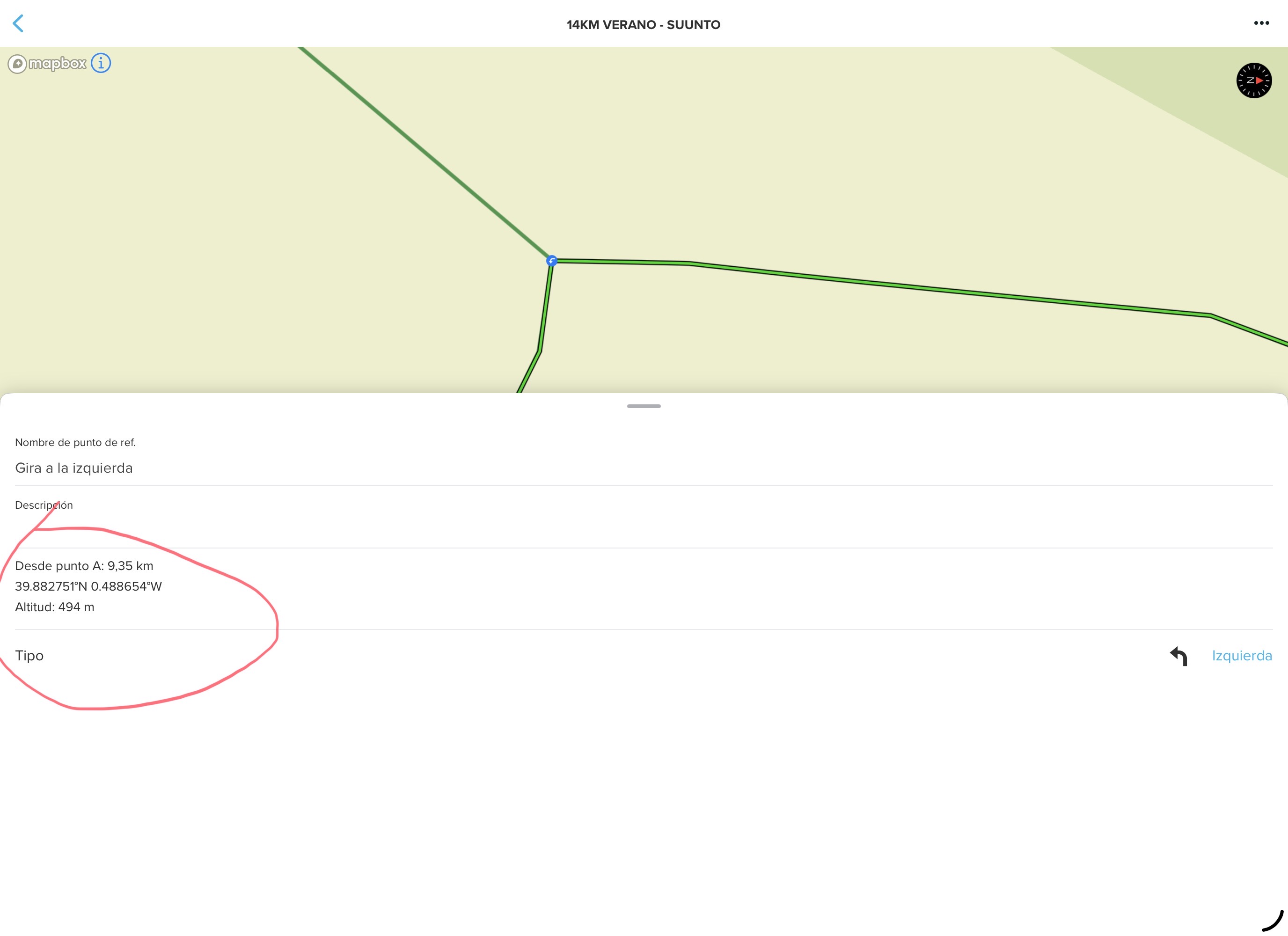
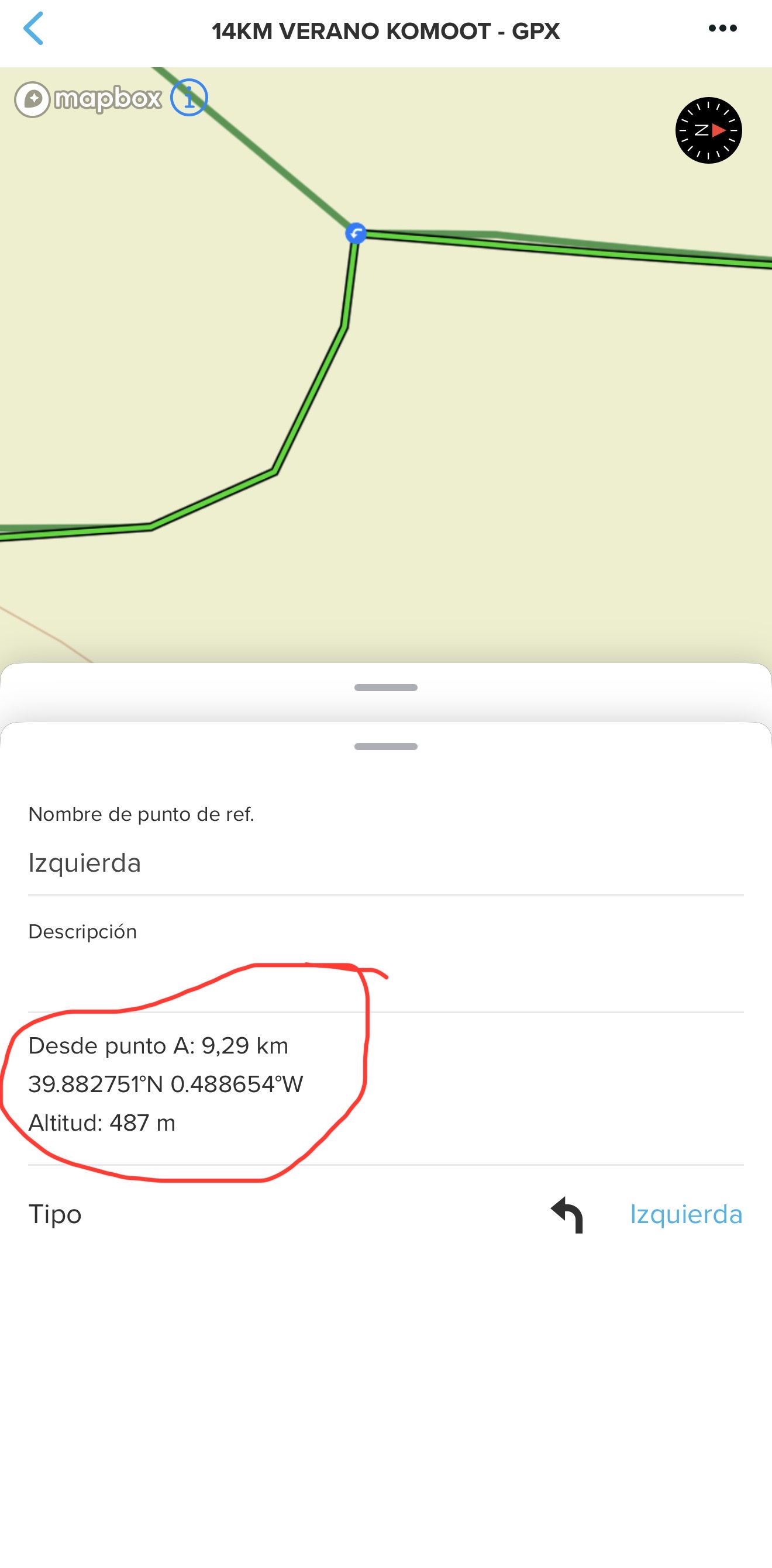
Example from the screenshots:
Same turn coordinates:
- 39.882751ºN 0.488654ºW
But different cumulative route distances:
- Komoot: 9.29 km
- Suunto App: 9.35 km
This strongly suggests there may be inaccuracies in how Komoot calculates cumulative route distance between navigation points.
Additionally, the Komoot route geometry itself appears more simplified, with fewer intermediate track points and straighter path interpolation.
That simplification may explain why some turn notifications feel delayed despite the physical turn location being correct.
Additionally, it also creates some unnecessary turns, since if I go straight ahead on the same route, there’s no need for a “go straight ahead” notification.
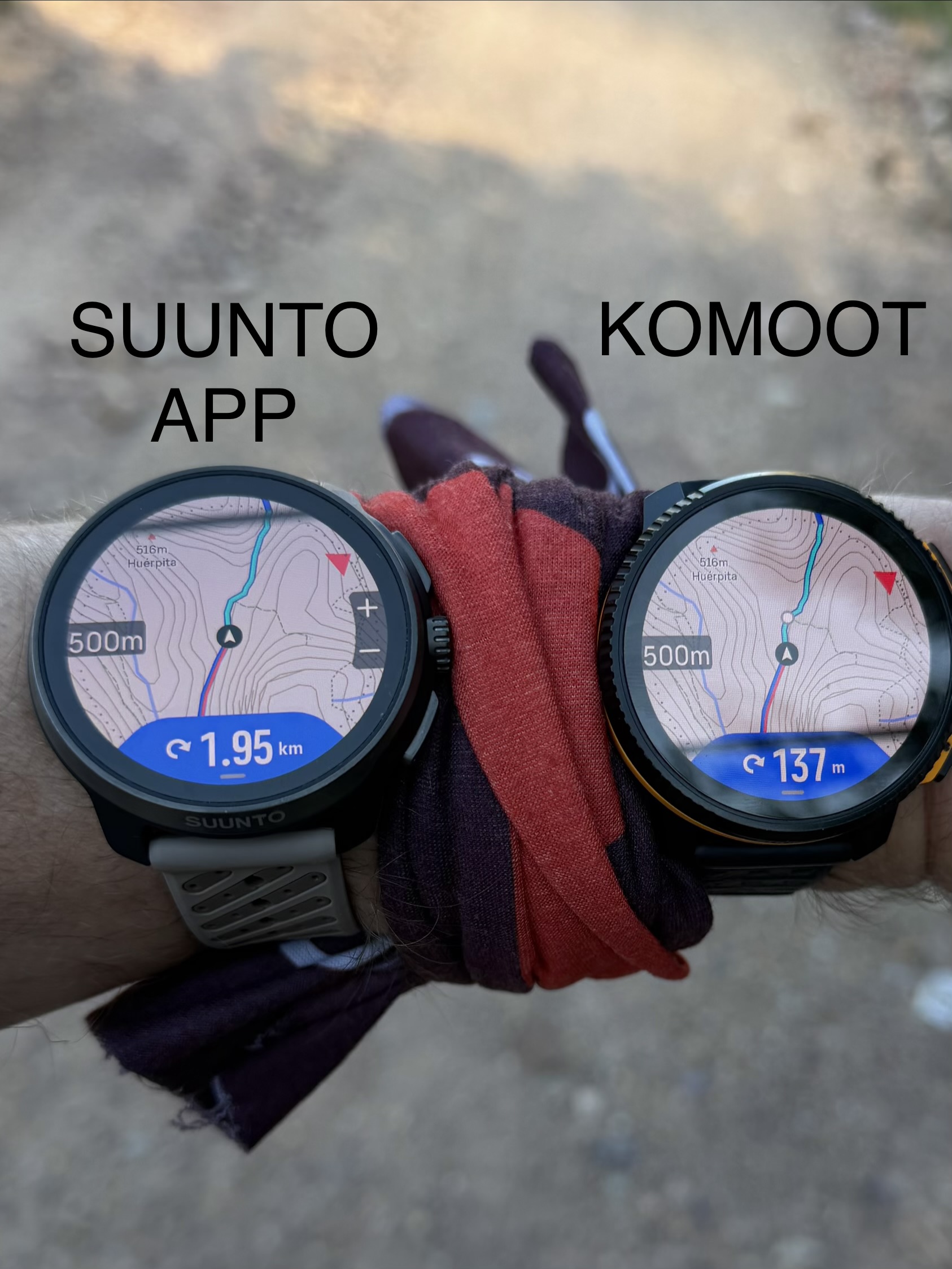
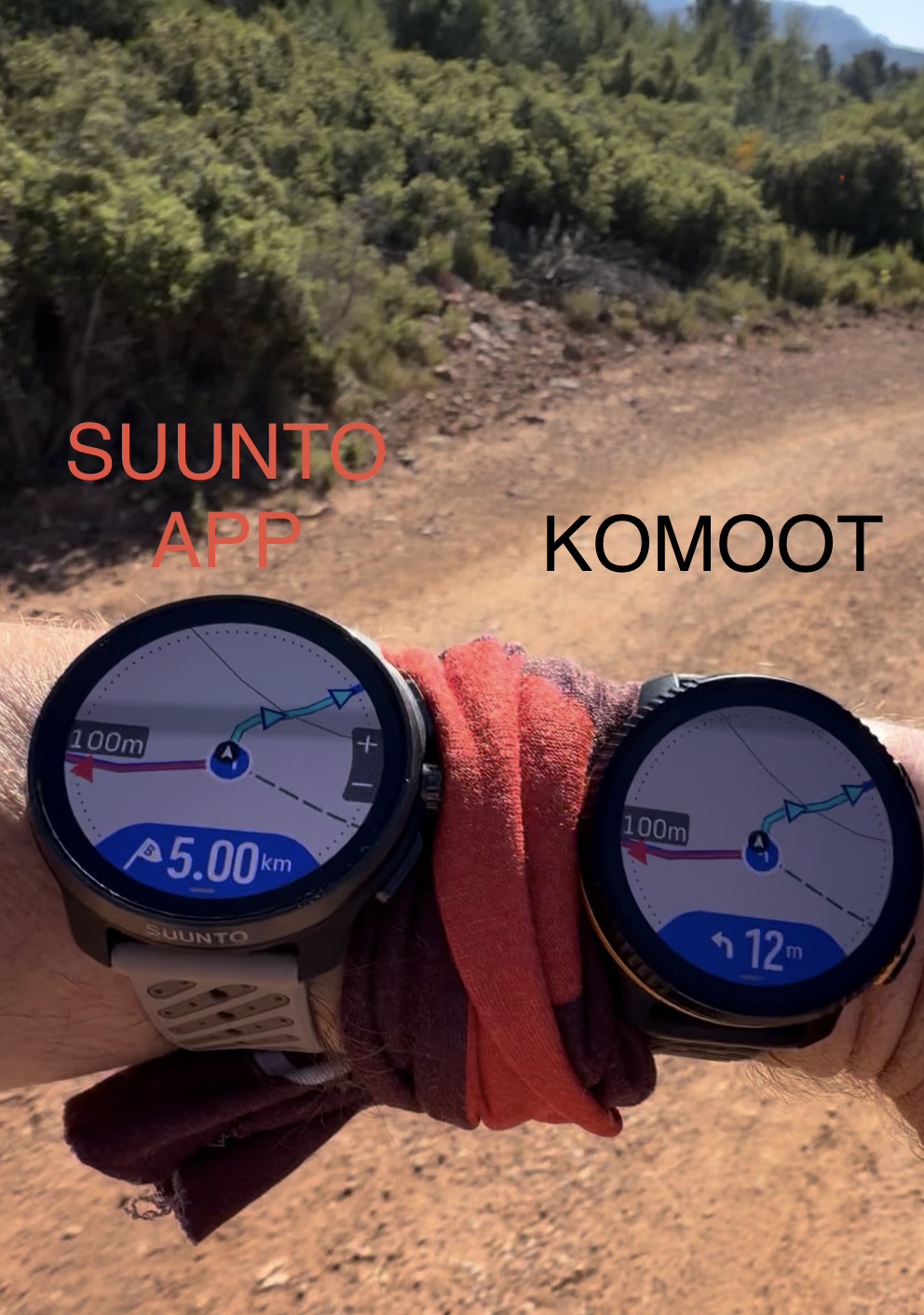
Overall, after recreating and testing the exact same route in both ecosystems, the main problems I found in Komoot can be summarized as follows:
- Less accurate total distance calculation
- Lower-quality DEM elevation data
- Simplified elevation profiles with loss of terrain detail
- Inconsistent ascent/descent calculations
- Less precise climb segmentation
- Reduced Climb Guidance accuracy
- Oversimplified route geometry with fewer intermediate points
- Delayed turn-by-turn notifications in some situations
- Inconsistent cumulative distance calculations between navigation points
- Navigation behavior that feels less precise on the watch despite correct GPS positioning
The most important conclusion is that many of the perceived navigation or Climb Guidance inaccuracies on the watch are not actually caused by the watch itself, but rather by the quality of the route, geometry, and elevation data generated by Komoot.
Technical & Product Specialist – Suunto Iberia
-
@Joaquin said in Several navigation issues (feedback):
The route generated in Komoot shows a shorter total distance compared to the same route created in Suunto App
I suppose this applies to Suunto’s online route planner as well, right?


Hello! It looks like you're interested in this conversation, but you don't have an account yet.
Getting fed up of having to scroll through the same posts each visit? When you register for an account, you'll always come back to exactly where you were before, and choose to be notified of new replies (either via email, or push notification). You'll also be able to save bookmarks and upvote posts to show your appreciation to other community members.
With your input, this post could be even better 💗
Register Login